This message has popped up on my new Windows 8.1 machine (I am new to 8.1, but used 7 and all before it). It won't go away, and it's hiding part of the screen. The only solution I have found via Google is to reboot. But the message itself is hiding the control where I can shut down or restart. O.K, I know I can use CTRL-ALT-DEL but I would like to know how to avois this craziness. Thanks
Asked
Active
Viewed 501 times
1

-
TRy what's outlined here: http://superuser.com/a/704622/23133 – Ƭᴇcʜιᴇ007 Apr 17 '15 at 17:56
1 Answers
0
If you don't want to see these notifications at all, you can use Group Policy Editor to disable it.
To start the Group Policy, do the following:
- Tap on Windows-R to bring up the run box of the system.
- Type gpedit.msc and hit enter.
- You may receive a UAC prompt which you need to accept by selecting yes.
Navigate to the following folder using the sidebar: Computer Configuration > Administrative Templates > Windows Components > File Explorer.
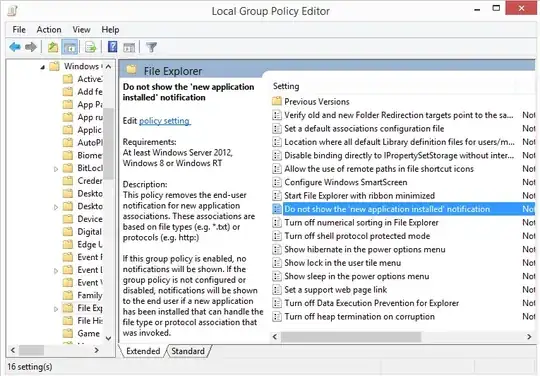
Locate the entry "Do not show the 'new application installed' notification and double-click on it.Set it to enabled to block the notification from showing up.
Source - Disable “you have new apps that can open this type of file” in Windows 8

CharlieRB
- 22,566
- 5
- 56
- 105
-
This will forcibly disable that notification when there are actually new apps that can open files of a certain type – thilina R Apr 17 '15 at 18:25
-
Yes. That is why the first sentence of the answer says *If you don't want to see these notifications at all*. There unfortunately is no way to selectively disable them. – CharlieRB Apr 17 '15 at 18:29
-
I did see that. But wanted to point it out again since it seemed too drastic. Under normal circumstances, this doesn't always pop up as described in the question. That leads me to believe that there might be something wrong which causes it to stay there without going away. IMHO this is a band aid and not the real solution to the problem – thilina R Apr 17 '15 at 18:40
-
I did actually find the solution at ghacks, but 'gpedit.msc' isn't found on my system, I presume it's only in Pro versions. Anyway, as others have commented, this seems too drastic - the popup window could be useful if (a) it suggests what other apps are available, and (b) closes when you want it to – quilkin Apr 17 '15 at 19:18
-
Great! Did you find the same solution or a different one? If it is different, please post your own answer to share how you solved your question. – CharlieRB Apr 17 '15 at 19:20
-
sorry, should have said I found a 'potential' solution; as mentioned I couldn't use it unless I have 8.1 pro. The only solution I have found is CTRL-ALT-DEL-restart. Roll on Windows 10...... – quilkin Apr 17 '15 at 19:23
-
@quilkin Yup, on Windows 10 I believe this would be something that would be displayed in the notification area – thilina R Apr 17 '15 at 20:47
-
@quilkin Did you install any software recently after which this started? Usually, this notification appears when a program tries to change file associations https://msdn.microsoft.com/en-us/library/windows/desktop/hh848047%28v=vs.85%29.aspx – thilina R Apr 17 '15 at 20:58
-
@slayernoah - it's a new machine and I installed VS 2013 Community Edition on it a few days ago, along with Cordova (tools for cross-platform javascript development). I think it happened when I tried to open an XML file from Explorer rather than from within VS2013. Can't seem to replicate the problem though, so perhaps I can forget about it. – quilkin Apr 17 '15 at 22:06
-
@quilkin Thanks for the additional information. Let us know if you are able to replicate. Would be good to know what happens when you click on the notification. Does it show a list of programs that you can set as default for that file type? Also, would be good to know if UAC is enabled – thilina R Apr 17 '15 at 22:57
-
@slayernoah - I partly replicated it, in Explorer by opening an XML file with Notepad. But this time the popup disappeared by itself, almost before I had a chance to read it. No list of alternative programs, that's one of my criticisms! Also no close button. UAC is enabled, I didn't elevate to admin. – quilkin Apr 18 '15 at 13:49
-
Let us [continue this discussion in chat](http://chat.stackexchange.com/rooms/22964/discussion-between-slayernoah-and-quilkin). – thilina R Apr 18 '15 at 15:56