0

Editing a text area and hitting Command+V doesn't just paste the text, it turns the entire text block into a numbered list. I've spent hours now and can't figure out how to fix Command+V to just be a normal paste. Any ideas?
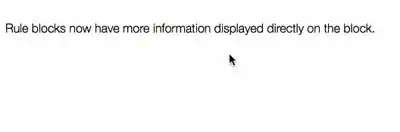
example

Steps in gif above

  1. Double click text box for editing
  2. Double click word to select it
  3. Command+C
  4. Move the cursor one char forward
  5. Command+V

For some reason we now have a list for no apparent reason.

Fresheyeball
  • 151
  • 2
  • 4
  • 14

1 Answers1

0

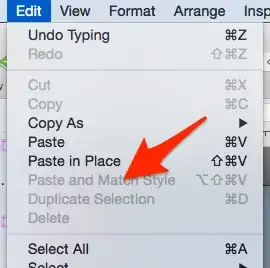
Making the assumption that the source text you are copying is being displayed as a list, you want to use the "Edit -> Paste and Match Style" option.

enter image description here

For example, the following list created using the SE markdown:

  1. lorem
  2. ipsum
  3. dolar
  4. sit
  5. amet

Appears thusly when I highlight it, copy and then just use command-v to paste:

enter image description here

But appears thusly when I use the 'Paste and Match Style':

enter image description here

UPDATE 01

Alternatively, your text block may be set to a list. The number might have previously been deleted, but the list attribute remains set.

Double click into the text for editing and look at the toolbar just above the ruler.

enter image description here

Open the menu and verify that "None" is selected.

enter image description here

When "None" was not selected I was able to replicate your question's behavior. With "None" selected I was unable to replicate.

  • The source text is paragraph text in omnigraffle. I am aware the "paste and match style" sort of does what I want, (except that it overwrites styles and is not on `ctrl+v`). Could what I am experiencing a bug? – Fresheyeball May 26 '15 at 22:36
  • Can you update your question with a few screenshots of the source text and the result, after pasting? If you can include the rulers as part of the screenshot that might help. I've never run into this using OmniGraffle 4-6 before, unsure if it is a quirky bug. – Nicholas Pappas May 26 '15 at 22:39
  • I added a gif showing the annoying behavior. – Fresheyeball May 26 '15 at 23:01
  • Answer updated based on question updates. – Nicholas Pappas May 26 '15 at 23:11
  • Hmmm.... I don't have the Yosemite version, my omnigraffle does not appear to have that option. – Fresheyeball May 26 '15 at 23:14
  • I have the non-Yosemite version of OmniGraffle 6 at home, I will investigate later this evening. – Nicholas Pappas May 26 '15 at 23:20
  • @Fresheyeball - OmniGraffle 6 (regardless of Yosemite install) appears to show the above "Lists" drop down, when text is selected for editing, as long as the rulers are visible. Make sure they are shown with 'View -> Rulers' menu. – Nicholas Pappas May 27 '15 at 03:57