6

I just booted up and it was like this, everything is zoomed in, but only in Chrome. Even the menu's in chrome are huge. Is this normal? How can I bring this back to normal?

Here is a picture.
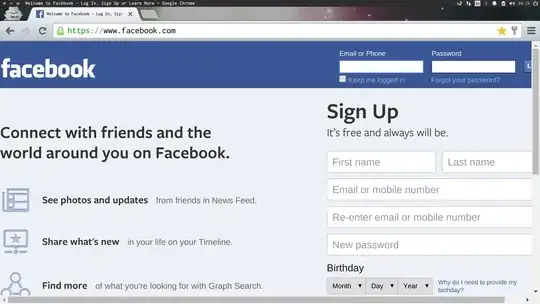
enter image description here

Ayan
  • 2,951
  • 3
  • 19
  • 22
  • It's probably caused by your system font/theme – Roemer Jun 10 '15 at 07:47
  • tried changing that, doesn't do anything. – TheDudeAbides Jun 10 '15 at 08:00
  • 1
    Just adding in a "me too." Ubuntu 14.04, applied updates and restarted this morning. I've been using this install for over a year, but today this happened. Edit: Found more people who have this problem today, with various work-arounds : [AskUbuntu Thread](https://askubuntu.com/questions/634502/chrome-tab-menu-url-bar-and-web-pages-have-got-really-big#new-answer), [Reddit thread](https://www.reddit.com/r/chrome/comments/399cle/chrome_suddenly_low_resolution_large_tabs_and/) – aveneyer Jun 10 '15 at 15:17
  • A similar question is http://askubuntu.com/questions/634999/ . – JdeBP Jun 11 '15 at 19:06

3 Answers3

2

Looks like this chrome bug:

https://code.google.com/p/chromium/issues/detail?id=498426

Apparently, running google-chrome with --force-device-scale-factor may fix it.

pwaller
  • 201
  • 1
  • 2
2

Unfortunately I don't have 50 rep on superuser so can't comment on the answer that nearly works. /opt/google/chrome/chrome --force-device-scale-factor=1

did work for me. the answer above didn't have the =1 so it may be the reason it didn't work for you.

JimB
  • 121
  • 2
0

Alternative is to use Chromium.

You can install it using sudo apt-get install chromium-browser.

It features the same sign-in functionality and add-ons like Chrome does.

user813
  • 109
  • 1
  • This does not provide an answer to the question. To critique or request clarification from an author, leave a comment below their post - you can always comment on your own posts, and once you have sufficient [reputation](http://superuser.com/help/whats-reputation) you will be able to [comment on any post](http://superuser.com/help/privileges/comment). – DavidPostill Jun 10 '15 at 13:27
  • Sorry @DavidPostill, my intention was to comment because it's not a solution, but I didn't have enough reputation. – user813 Jun 10 '15 at 23:38