I have 2 monitors and a TV connected to my video card (AMD R7 260x)
Monitor 2 (primary): 1920x1080, DVI
extends to
Monitor 1: 1920x1080, VGA
cloned to
Television: 1920x1080 HDMI
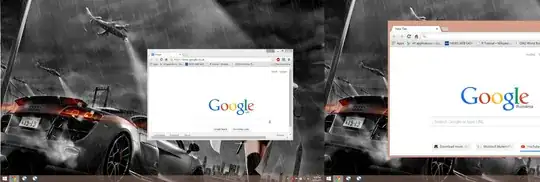
The problem is, the image on the secondary monitor and TV is stretched, as if they were a different resolution. As seen with these chrome instances, they should be the same size. Moving a window from one monitor to another changes its size, if I move the big chrome instance to the left monitor, at some point when crossing the edge it will instantly change to the normal version.
It fixes itself when I change the resolution to something else then change it back to 1920x1080. But it goes back to the ugly mode after reboot.
What I tried:
Reinstalling Video Driver
Reinstalling Windows
Change scaling (now it's set to be the same on all displays, but it doesn't have any effect)
I don't even know if it's a Windows issue or a Video card driver issue.
Has anyone had this issue before? I don't know where to turn to, it's very annoying to have to change resolution after every reboot.
