71

I use an online file backup service (Backblaze) and recently got a new computer. Several files on my old computer were too large to move via my usb drive so I decided to download them from my backup service.

Specifically the files included 3 videos consisting of about 20GB.

However...when I proceeded to unzip them, I got the following error message:
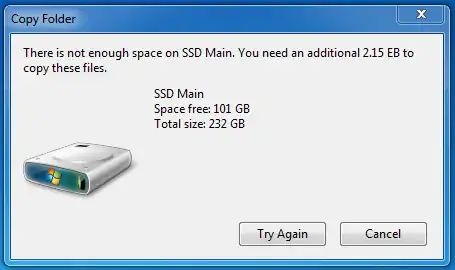
Error message: 2.15 EB needed to unzip archive

I use a 250Gb SSD, and a 1TbHDD. I failed to pick up a 2.15 Exabyte Hard drive while picking out my new computer though.
How do I fix this?

meed96
  • 2,161
  • 3
  • 17
  • 18
  • 94
    *"I failed to pick up a 2.15 Exabyte Hard drive while picking out my new computer though."* Cheapskate. – Adam Davis Jul 03 '15 at 04:23
  • 9
    When you wouldn't have said that the archive comes from a trusted source, I would have suggested that the zip archive might be a [zip bomb](https://en.wikipedia.org/wiki/Zip_bomb). It is possible to hand-craft zip archives which are quite small when compressed but of ridiculous size when unpacked. – Philipp Jul 03 '15 at 09:25
  • 1
    Off the top of my head, I think the maximum DEFLATE compression ratio is 2 bits per 258 bytes, or 1:1032. – mwfearnley Jul 03 '15 at 11:26
  • 26
    Respect to Microsoft though for including exascale-compatible devices in their design and test cases. Seems they have learned since the 640KB days. :) – Lunatik Jul 03 '15 at 13:01
  • 13
    18,446,744,073,709,551,616 bytes ought to be enough for anybody! – Michael Hampton Jul 03 '15 at 15:57
  • 7
    @AdamDavis: We'll be having a second round of laughs in a few decades (or less) when EB scale storage becomes feasible for the average user. – rovyko Jul 03 '15 at 20:04
  • 3
    That compressed size looks very fishy--converted to binary it has a 1 in the 48th bit and the whole next word is zero. That looks like data corruption, I doubt there's any extractor that will appreciate this. – Loren Pechtel Jul 05 '15 at 02:34
  • @LorenPechtel Yeah it's weird, but I trust the site I got them from. And I just tried playing the videos and they seem to be working completely fine, so, no damage as far as I can tell. – meed96 Jul 05 '15 at 02:36
  • 1
    According to Wikipedia (https://en.wikipedia.org/wiki/Exabyte#cite_note-10), global data volume at the end of 2009 had reached 800 exabytes. You posses about 1/400th of all knowledge on earth at that time. I'm genuinely impressed. – mxt3 Jul 09 '15 at 21:10
  • This looks like zip bomb. – Konrad Gajewski Sep 07 '18 at 05:52

3 Answers3

67

Use a different file archive tool (such as 7-Zip) to unzip the files.

Not all .ZIP features are supported by the Windows Compressed Folders capability. For example, AES Encryption, split or spanned archives, and Unicode entry encoding are not known to be readable or writable by the Compressed Folders feature in Windows versions earlier than Windows 8.

https://en.wikipedia.org/wiki/Zip_(file_format)#Implementation

Steven
  • 27,531
  • 11
  • 97
  • 118
1

Download and the latest version of daemontools lite. Once it's installed, rightclick on the .zip file and select open with. Browse to where daemontools was installed. Once found, daemontools will create a virtual drive which contains the content of the .zip file - it will be created on next available drive letter.

fixer1234
  • 27,064
  • 61
  • 75
  • 116
Jim Nielsen
  • 455
  • 2
  • 7
  • 1
    Jim, it looks like you created a second user ID, which will interfere with your ability to manage your own posts and accumulate rep. See http://superuser.com/help/merging-accounts about getting your accounts merged. (Afterwards, you should just delete your previous answer.) Sounds like a good solution, BTW. – fixer1234 Jul 11 '15 at 23:57
0

Another option to "unzip" the file, is the use Daemon Tools and map the zip file as a virtual drive from where you can copy the content to desired location. This way you don't need space for both the .zip file and it temporary space when unzipping it using either WinZip, 7-Zip, WinRar.