2

I've recently gotten a new router to handle a 1GB internet connection (yes, 1GB) because my old router shouldn't be able to handle such a massive connection. But with it came a whole new lay-out and firmware which makes port forwarding not work for me anymore. I am using a ZyXEL VMG8324-B10A on firmware version 1.00(AAKL.8)C0 (possibly Tomato..?)

So the port forwarding is a lot more extensive and I am not able to find any working solution on Google.

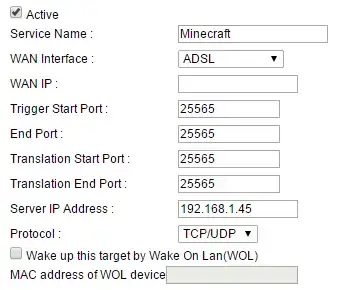
This is how my port forwarding window looks like right now:
enter image description here

As you can see I am trying to forward port 25565 (Minecraft) for people to join my homeserver.

Does anyone have any idea how to port forward this port properly? I can join my own server with my own network's LAN IPv4 address but when trying to join with my external IP I get an error.

Any possible fix will be greatly appreciated.

DavidPostill
  • 153,128
  • 77
  • 353
  • 394
Emilian
  • 23
  • 3
  • According to the user manual ftp://ftp.zyxel.com/VMG8324-B10A/user_guide/VMG8324-B10A_.pdf, page 160 you need to fill in `WAN IP` - "Enter the WAN IP address for which the incoming service is destined. **If the packet’s destination IP address doesn’t match the one specified here, the port forwarding rule will not be applied**" – DavidPostill Jul 11 '15 at 22:38
  • If you don't have a fixed WAN IP address then you also need to look at a Dynamic DNS service (like http://www.noip.com/free) for example). – DavidPostill Jul 11 '15 at 22:41
  • Try putting your public IP address in your wan ip bar – Aiden Grossman Jul 11 '15 at 22:57
  • what is the error you get when doing an external connect – Aiden Grossman Jul 11 '15 at 22:59
  • Ordinarily, port forwarding is not expected to work when an inside private host attempts a connection to the outside public forwarded IP:port. – Nevin Williams Jul 12 '15 at 03:18
  • @DavidPostill I did this with my external IP gotten from whatsmyip.org and it's still not working.. All the sections are now filled in but it's still not working. Any idea why? – Emilian Jul 12 '15 at 17:37
  • @Emilian Are you trying to connect from a machine outside of your network? – DavidPostill Jul 12 '15 at 17:40
  • @DavidPostill I have tried by asking my friend to connect but that doesn't work either. When I try to connect from my external IP in my own house it doesn't work either. My IPv4 works fine though (192.168.1.45) – Emilian Jul 12 '15 at 17:44
  • @Emilian It will never work when you connect to your public ip from a local private ip unless your router supports "Nat loopback". Most domestic grade routers do not support this. – DavidPostill Jul 12 '15 at 17:48
  • @DavidPostill Thanks for the information, though my friend still isn't able to connect (we just tested it) and canyouseeme.org says that port 25565 is still closed. I really don't know why it isn't working, it always has worked with my previous router. – Emilian Jul 12 '15 at 17:57
  • @Emilian 1. Is there a firewall on the server? Try turning it off. 2. If that doesn't work try turning of the port forward rule and use a dmz instead (see p165 of the manual). – DavidPostill Jul 12 '15 at 18:05
  • @DavidPostill I have turned off the firewall and turned on UPnP. No success. However, when I use the DMZ and turn my firewall on and the UPnP off it works. Conclusion: DMZ works. But it's really sketchy to me that port forwarding is just not doing the trick. What are the risks of DMZ anyway? But I do have to say thank you very much for making it work. If you reply in an actual answer I will give you the best answer. – Emilian Jul 12 '15 at 18:18
  • @Emilian answer created. If I have time later I will update regarding DMZ risks. – DavidPostill Jul 12 '15 at 18:32
  • @DavidPostill Never mind! I found the error! I had to change the WAN interface from ADSL to ETHWAN and now everything is working as intended. Your effort wasn't in vain though, because I wouldn't have gone so deep if you weren't helping. I will modify your answer for you (but still give you best answer) for people in the future that have this problem. Thanks a ton! – Emilian Jul 12 '15 at 18:38
  • @Emilian I've modified the answer to include your edit. – DavidPostill Jul 12 '15 at 18:48

2 Answers2

0

To do this you should be able to just fill in your WAN IP with your public ip address which you can get by googling what is my ip. You could also try flashing your router with another firmware which has simpler port forwarding.

Aiden Grossman
  • 255
  • 1
  • 10
0

Port Forwarding error with new router

You have to change your WAN Interface from ADSL to ETHWAN and everything should be working as intended.


Alternative Solution

An alternative approach is to put the minecraft server in a DMZ.

See p165 in the router manual (ftp://ftp.zyxel.com/VMG8324-B10A/user_guide/VMG8324-B10A_.pdf) for instructions on how to do this.

Note that this potentially has some risks.

DavidPostill
  • 153,128
  • 77
  • 353
  • 394