1

As you can see in this screenshot, KMPlayer changes my video by making the colors look brighter. VLC on the right, has no problem accurately displaying the colors.

I already tried resetting all the settings, and then reinstalling KMPlayer but this problem seems to persist.

I am clearly no expert in this field but I'm guessing KMPlayer is defaulting to an inaccurate color profile in the system. Any ideas on how to fix this? Thanks a lot.

john
  • 162
  • 2
  • 10

1 Answers1

1

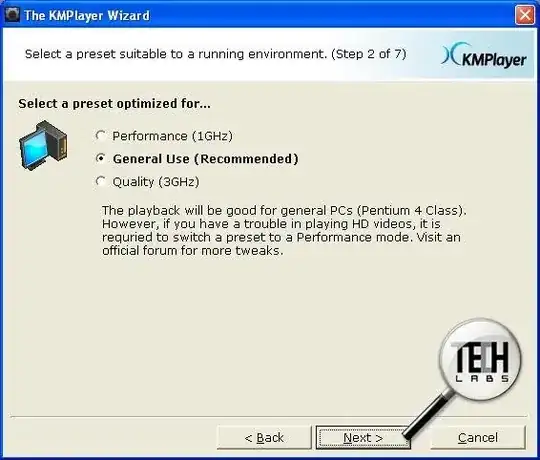
I am faced with the same problem and found out that the reason is in default quality/perfomance settings in KMPlayer.

Screenshot - installer's chosen quality option by default:

Image

I don't know why, but "General (Normal) preset" makes video brighter.

So, to fix the problem we just need to choose option "Quality (3Ghz)":
Menu -> Video (Advanced) -> Preset: Quality (3Ghz)

Screenshot - how to find option "Quality (3Ghz)":

Image

Stephen Rauch
  • 3,091
  • 10
  • 23
  • 26
devorld
  • 11
  • 1