3

I am using Microsoft Project 2003 find command.

When I choose ctrl+f and type a string to search for, MS Project only appears to search tree nodes that are expanded.

Is there a way to get MS Project to search across all fields, even those that are collapsed?

Failing that, is there a shortcut to expand ALL nodes in the project?

frankadelic
  • 357
  • 2
  • 5
  • 16

2 Answers2

2

Sorry - I have been messing around for a while for you and I cannot find anyway to search for collapsed tasks.

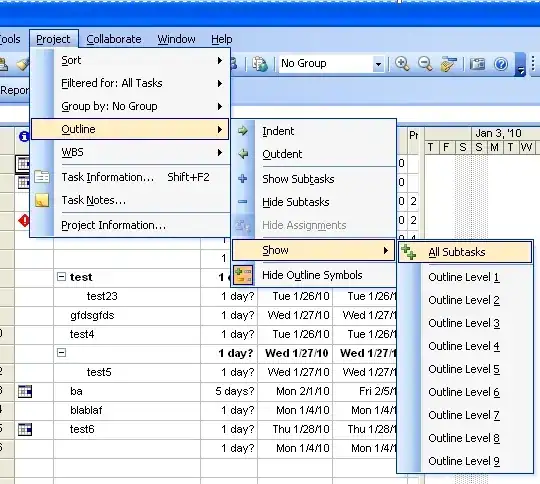
As for expanding all, you can click the Show dropdown and then choose All Subtasks which should expand them all.

alt text

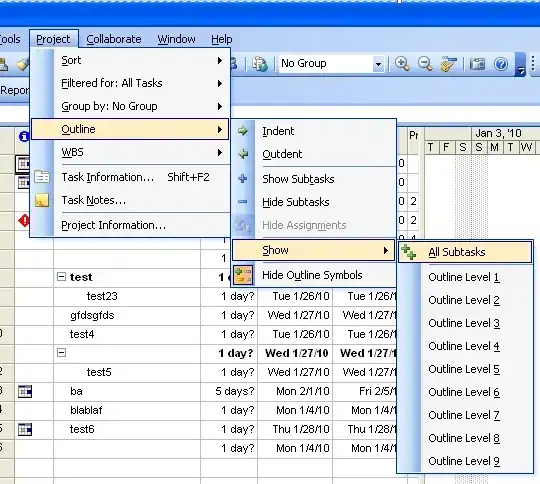
You can also get to it via the menu bar - Project > Outline > Show > All Subtasks.

enter image description here

Gaff
  • 18,569
  • 15
  • 57
  • 68
William Hilsum
  • 116,650
  • 19
  • 182
  • 266
  • The limited search capability is one of MSProject's (many) annoyances. Solution is to expand to all subtasks as shown above, then search. – DWong Jan 28 '10 at 20:38
0

A workaround is to switch on Auto filter (Project -> Filter -> Auto filter). If you switch it on Task name, you can set a custom filter with containing text, like in Excel.