25

After upgrading my host to 12.04 I can no longer connect to Windows Shares in my AD (Active Directory) based network. I was able to do it previously using 11.10. I thought it might be an issue with the upgrade so I flattened my box and re-installed from scratch and I still can't connect.

When I use the Files>Connect to Server command, I am met with a constant password challenge when accessing any windows server using any known working network account.

I checked the logs on the windows machine to see if there are failed connections but there are none, yet 12.04 asks me for my password over and over as if my credentials were wrong.

Any suggestions?

Braiam
  • 66,947
  • 30
  • 177
  • 264
dotdawtdaught
  • 727
  • 2
  • 8
  • 14
  • I too have the same issue, my bookmarked shares to domain servers all worked before I upgraded to 12.04 but now I can't access them, it just won't authenticate. –  May 09 '12 at 21:01
  • the same thing is happening here. Have you made any headway on this issue? I was going to try downloading the Live CD of 11.10 and see if I can still connect to my servers. If I can, I guess its something borked up with Samba as it ships with 12.04. I will probably just regress back to 11.10 and wait until it gets sorted out. – dotdawtdaught May 09 '12 at 22:31
  • OK, so I just booted off the 11.10 live CD and my networking shizzle works just like it did before. It looks like 12.04 just isn't ready for Windows Networking. I am just going to reinstalled 11.10 and get back to work. Thanks for your suggestions. – dotdawtdaught May 10 '12 at 00:46
  • A more recent question and answers: http://askubuntu.com/questions/623133/how-to-open-shared-smb-resources-in-the-form-host – AlikElzin-kilaka Jun 06 '16 at 07:48

10 Answers10

15

It's syntax in this case that seems to be causing the issue. I can verify that when I type the server and domain in lowercase with my credentials, it does not connect.

However...

When I type the server and domain in all CAPS with my credentials, it connects just fine.

Server Name and Domain need to be all in CAPS. Forgive my horrible outlines... :)

jamesmike87
  • 236
  • 1
  • 6
3

I was having the same issue connecting to windows shares through nautilus. I was able to connect without issue by mounting shares from the command line, but it's just not as convenient.

What fixed it for me was typing my domain in all caps. Lowercase domain name will never connect. Uppercase connects every time. Weird.

mcmoyer
  • 41
  • 2
2

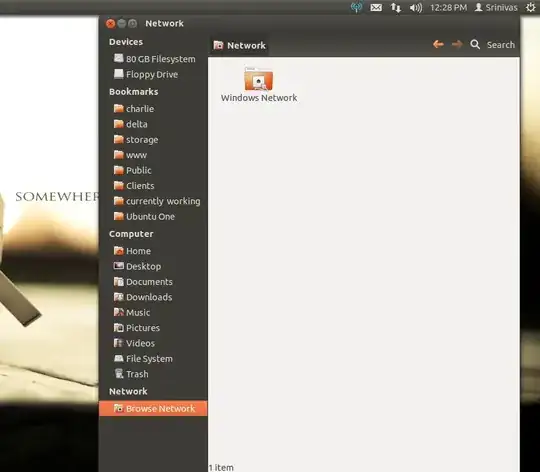
Well if both your machines are connected over LAN then you should be able to access your windows machine using the Browse Network option in nautilus.

And have a read of https://help.ubuntu.com/10.04/serverguide/samba-ad-integration.html


Or try using connect to server and use the samba share protocol to connect

smb://ip-address-of-windows-machine


enter image description here

Srinivas Gowda
  • 2,398
  • 21
  • 27
  • Thanks for the suggestion. When I browse the network, I poker around in Network>Windows Network>DOMAIN>Server and I am challenged for user credentials. When I enter in my credentials (known working) they are not accepted. Again there are no failed authentications in my windows server logs. – dotdawtdaught May 09 '12 at 07:25
  • try connecting using samba share protocol `smb://ip-address-of-windows-machine` – Srinivas Gowda May 09 '12 at 07:35
  • 1
    Where should I type this URL? – dotdawtdaught May 09 '12 at 07:38
  • OK, so I just booted off the 11.10 live CD and my networking shizzle works just like it did before. It looks like 12.04 just isn't ready for Windows Networking. I am just going to reinstalled 11.10 and get back to work. Thanks for your suggestions. – dotdawtdaught May 10 '12 at 00:46
2

It's definitely something with the GUI, because I had the same problem, but the method described in http://deathofagremmie.com/2012/05/01/mounting-a-synology-diskstation-on-ubuntu-12.04/ worked fine--at least, to attach to my Buffalo TeraStation on my local network. Can't say whether this will work in an AD environment.

Ed Horch
  • 21
  • 3
1

I had to use a domain\\username notice the extra slash there. if I did an Alt-F2 and put in smb://Servername/sharename I had to add a \ before the username.

jasonamyers
  • 111
  • 2
1

In order to reconnect to my windows shares saved in 11.10 nautilus bookmarks, I went to the "edit bookmarks" menu item and edited as follows:

my username and domain were encoded in the "Location" field as smb://domain;username@server/share/folder when just upgraded from 11.10 to 12.04.

I changed to smb://domain%5Cusername@server/share/folder and, after being asked for my password, I successfully connected. I guess this is in the spirit of the reply by jasonmyers.

A.S.
  • 11
  • 1
1

This answer was in a different thread that I can't find at the moment. It worked perfectly and permanently for me.

In /etc/samba/smb.conf add the following to the bottom of the [global] section:

client lanman auth = yes
client ntlmv2 auth = no
Eliah Kagan
  • 116,445
  • 54
  • 318
  • 493
nhorning
  • 453
  • 4
  • 5
0

Active directory (AD) is a bit more complex than just samba sharing.

https://help.ubuntu.com/community/ActiveDirectoryWinbindHowto

AD is the replacement for the windows 'domains' and has an authentication server. It's not the same as workgroup based shares that just need cifs loaded and you're in.

  • 1
    I shouldn't need to bind to the AD to connect to a share. It worked fine with 11.10, It only seems that it's borked in 12.4. – dotdawtdaught May 09 '12 at 19:16
  • maybe the binding broke in the upgrade? Are you absolutely certain this is full AD and not just a peer network? –  May 09 '12 at 19:33
  • I am sure it is a AD network. As I mentioned before, it was in good working condition previous to the upgrade. I am going to regress my Ubuntu machine to 11.10 and see if the connectivity is restored. I am suspicious that Samba was boofed when it shipped with 12.04. Thanks again for your suggestions. – dotdawtdaught May 09 '12 at 22:50
  • OK, so I just booted off the 11.10 live CD and my networking shizzle works just like it did before. It looks like 12.04 just isn't ready for Windows Networking. I am just going to reinstalled 11.10 and get back to work. Thanks for your suggestions. – dotdawtdaught May 10 '12 at 00:45
0

Had the same problems, i.e. able to connect to Windows shares on AD networks in Lucid (10.04) but not Precise (12.04). Seems slightly different syntax is needed. I accessed AD shares without problems by browsing the network in Nautilus and using 'domain\user' where 'domain' may be just the 2nd level domain in 'domain2.domain1.topleveldomain' (e.g. corp.mydomain.com) for user, then fully qualified domain name for domain, and then the password. Hope this helps.

OttoPilot.

0

You can just type in the SMB path in the Ubuntu search tool (Alt + F4). That worked for me. Just type in smb://nas-server/some-path and it will load up.

Reference: http://www.howtogeek.com/howto/29167/3-easy-ways-to-connect-to-windows-shared-folders-from-linux/

Patrick
  • 254
  • 2
  • 12