0

I was trying to install Kubuntu 20.04 as a small partition on my HDD. All was going good until I was using the guided option to resize my HDD to make a partition to Install. When it finished creating the partition, I went back to confirm everything was set to the correct drive,thinking that I could go forward from there using the newly made 30gb partition, but it seems that I can not continue. How do I install to the free space without deleting the remainder of my drive's contents.

EDIT: here is the installer's image
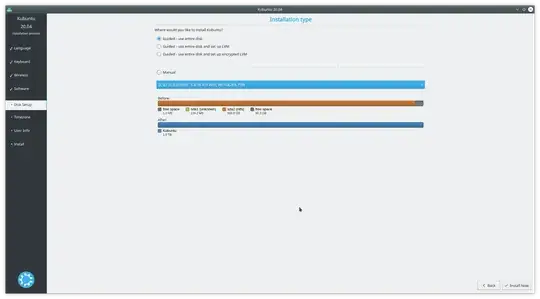
screenshot

Serg
  • 834
  • 7
  • 14
  • 1
    If a file-system is not *closed* (ie. all data written cleanly to the disk & not to *hibernate* or *fastboot* files, or partition table isn't clean, only a entire disk option maybe possible. Check you don't have a *fastboot* or *hibernate* active on your NTFS (likely windows) partition etc. – guiverc Oct 18 '21 at 05:12
  • In the screenshot, you've chosen `Guided - use entire disk`, this would do what it says, you have to chose `Manual` and then go forward and create new partition in the unallocated space. Please take a look at [this question](https://askubuntu.com/q/343268/590937). – mook765 Oct 18 '21 at 06:31
  • 1
    Don't make a partition for installation. Try starting the installation with unpartitioned free space. – Nmath Oct 18 '21 at 06:31

0 Answers0