When i connect OpenOffice ppt for projector, it doesnt display or detect anything.While i can run the same in my windows OS installed alongside. I donot know if it is a possible driver problem or a software problem. Please help incase someone has solved such a problem.
Asked
Active
Viewed 821 times
4

-
I'd say it is not a problem with Impress, rather with VGA output redirecting in Ubuntu. – Misery May 16 '12 at 11:28
-
So you mean to say it is a bug or depends on the system configuration or something? – bebojoor May 16 '12 at 11:30
-
I'd say this is a small config issue with monitors. Otherwise, you'll need to try different graphics drivers. Did you use a `nomodeset` workaround to get Ubuntu to work in the first place(You'll know if you did, otherwise, you may not have heard of the workaround) – nanofarad May 16 '12 at 11:52
-
It is not clear from your question, whether you actually did anything else apart from plugging in the projector? Ubuntu does not automatically switch additional displays on: on my laptop I have to press Fn+F8 in order to do that. Did you do something like this? – xubuntix May 16 '12 at 11:58
-
Nope ... I was looking for it to detect the device and ask for a connection or atleast a popup or directly start displaying in case the device is compatible... I didnt try any of the above... rather didnt know abt it. – bebojoor May 16 '12 at 12:07
1 Answers
3
When an external monitor / projector is plugged in, Ubuntu does not automatically switch it on. Normally, you can do this by pressing a key combination which depends on the keyboard you are using. Often its Fn+F8 or something similar, often containing two displays.
You can also click on [System Menu] -> Display...:
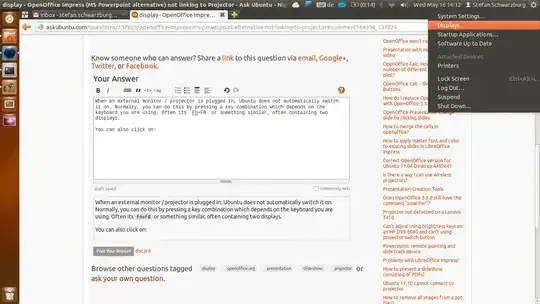
which brings up a dialog like this:
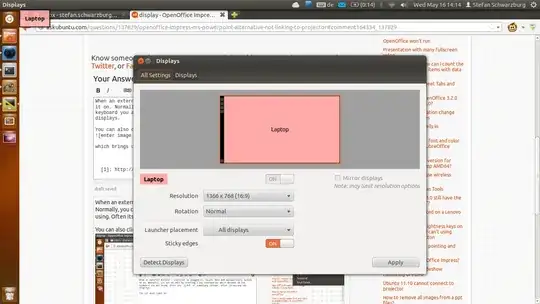
There you can fine tune the configuration you like. (relative position of the monitors etc.)
Note: LibreOffice has nothing to do with this.

xubuntix
- 5,550
- 23
- 40