8

My SIM card is stuck inside the slot of my laptop and I can't get it out without causing further damage to my laptop.

Every time I log in gnome-shell prompts me for the PIN. Whether I am about to use it or not.

On my phone I know I can disable the PIN altogether so that it doesn't get requested again (even if place the SIM card on another device). How can I do the same in Ubuntu?

d_inevitable
  • 1,882
  • 3
  • 22
  • 35
  • I don't have a piece of hardware like this on my computer to test with. Do you know the name of the daemon that is prompting for your password? Try `sudo pstree` while it is present and looking for something that might look like it. From there we might be able to alter it's config, uninstall it, or disable the hardware – Huckle May 28 '12 at 05:09
  • 2
    This is [bug #704123](https://bugs.launchpad.net/ubuntu/+source/network-manager/+bug/704123) marked as `fix released'. As a bug report this is off topic here. – Takkat May 28 '12 at 06:44
  • @Takkat, how is this a bug-report? I am asking for a workaround. I am on 11.10 – d_inevitable May 28 '12 at 15:41
  • @Huckle I suppose that would be NetworkManager. – d_inevitable May 28 '12 at 15:48
  • @d_inevitable: http://meta.askubuntu.com/questions/1317/what-to-do-with-questions-that-describe-bugs – Takkat May 28 '12 at 20:21
  • @Takkat I am not informing about a bug. I know the bug exists and I know that it is known and I know that it was apparently fixed. However it's fixed for me. So I need some help about getting to to work for me. And also as I've said, id rather disable the PIN on the SIM rather than simply saving it in NetworkManager. A bug report is a description of something that does not behave as it is supposed to. Not knowing how to disable the PIN or not knowing how to work around an existing and confirmed bug is clearly something else! – d_inevitable May 28 '12 at 20:37

4 Answers4

3

You can disable PIN checking using the built in GSM modem as described here.

herr-biber
  • 106
  • 1
  • 4
3

To avoid the popup, you can disable the PIN on your SIM card. As an alternative to using gsmctl as in the accepted answer, you can use qmicli. Assuming your PIN is 1234:

sudo apt-get install libqmi-utils
sudo qmicli -d /dev/cdc-wdm0 --dms-uim-get-pin-status
sudo qmicli -d /dev/cdc-wdm0 --dms-uim-set-pin-protection=PIN,disable,1234
sudo qmicli -d /dev/cdc-wdm0 --dms-uim-get-pin-status

(qmicli can also disable PIN2, should anyone need that.)

tanius
  • 6,053
  • 1
  • 37
  • 49
1

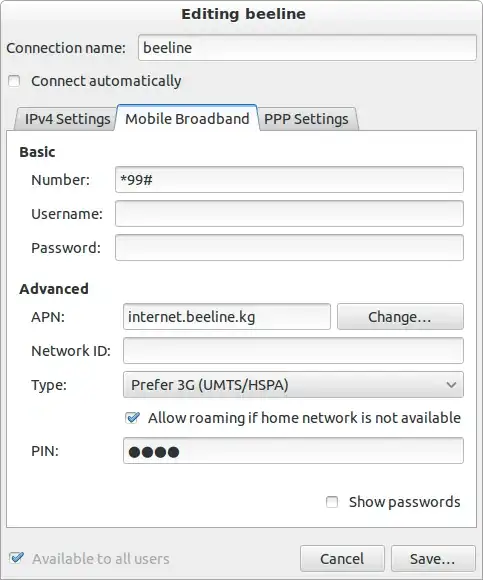
You can store the PIN in the configuration, then network-manager won't ask for it again.

Graphical Way

Open Network-Connections, go to tab 'Mobile Broadband'

Screenshot, Network-Connections

Click 'Edit' and go again to the tab 'Mobile Broadband'

Screenshot, Mobile Broadband

Enter your PIN here, then it shouldn't ask for it again.

Command-line

This is an alternative to the way described above. No need to do both ways!

cd /etc/NetworkManager/system-connections/

There open the configuration-file of your broadband with your favorite editor. In my case: sudo gedit ./beeline There should be a [gsm]-section, here you can add your PIN code pin=1234. If the gsm-section does not exist add the following to the end of the file:

[gsm]
pin=1234
Rough Dude
  • 157
  • 2
  • 9
  • In 11.10 due to a bug it did ask for a pin if you had carried out the steps you have described. It was a known bug. Not sure how it is now, as I've disabled the PIN on the SIM card. – d_inevitable Nov 03 '13 at 15:09
  • Sorry, I didn't read the comments under your questions carefully enough. Anyway: Thanks for the hint. – Rough Dude Nov 03 '13 at 15:15
  • In Debian Stable I got this to work with NetworkManager version 0.9.4.0-10. I assume the bug is fixed now, and the fix is in Ubuntu a long time now. – Martin Ueding Sep 19 '14 at 09:42
0

Usually one would take the sim card put it in a phone and change the pin code to 0000. which effectively disabled the pin. I don't know of any way you can change the pin of a sim card through the 3g modem in your laptop somehow. But if you can that would be the way

tomodachi
  • 14,542
  • 4
  • 31
  • 50