8

In Trash I can organize files by last modified date, and others, but I want to see last deleted files. Is there a way?

My "visible columns" options:

alt text

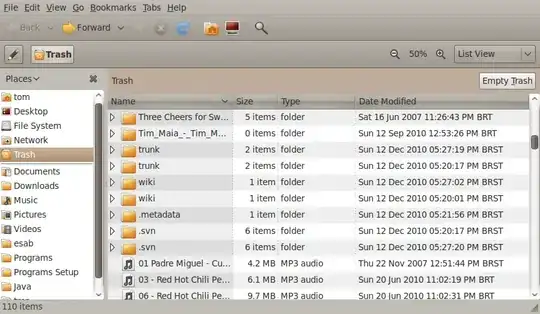
My Trash folder screenshot: alt text

Egil
  • 14,002
  • 2
  • 45
  • 54
The Student
  • 11,786
  • 27
  • 61
  • 94

2 Answers2

7

Yes, just go to the Trash folder and click on the heading of the column Trashed On.

To see the Trashed On heading, the view must be set to List View.
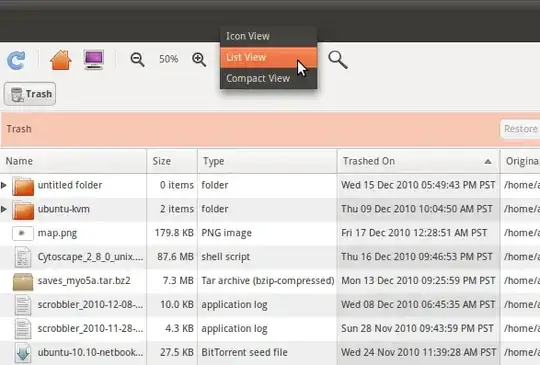
screenshot

  • you mean the trash folder itself, not by clicking on the trash icon? where's it? Opening by the trash icon there's no such column.. nither on view->"Visible Columns" menu. – The Student Dec 17 '10 at 18:30
  • In the trash folder look lower than the 'file edit view ...' row to find the 'name size type ... row'. In that row you will see it. –  Dec 17 '10 at 18:38
  • I added a screenshot. Hope you don't mind. – ændrük Dec 17 '10 at 19:02
  • @ændrük I'm using the List View already.. – The Student Dec 17 '10 at 19:08
  • There's no "file edit view" in the columns options.. I've added a screenshot, please, take a look. – The Student Dec 17 '10 at 19:10
  • Tom, what do you see instead of the screen andruk posted. Are you looking at the correct row? Also, after setting to the list view you may need to wait a while for changes to be effected if you did that from another folder for the changes to apply to all folders. –  Dec 17 '10 at 19:25
  • Try doing edit-->preferences-->view, and choose list view under default view. Wait a while for this to take effect system-wide. –  Dec 17 '10 at 19:31
  • I've posted one more screenshot showing my folder, please, take a look. – The Student Dec 18 '10 at 14:18
  • 2
    It appears that the "Trashed On" column was added in Ubuntu version 10.10. I'm not sure if there is a way to add it to previous versions of Ubuntu. – Dennis VanMeter Dec 18 '10 at 16:39
4

Trashed On and Original Location are both features of Nautilus 2.32.0, which comes in Ubuntu Maverick 10.10.

If you don't have these columns options in your Trash, all you have to do is update your Nautilus to the last stable version. :)

http://git.gnome.org/browse/nautilus/commit/?h=gnome-2-32&id=87d96729a8f74c5255f7973c257ebcc14fb57e16

Paulo Freitas
  • 570
  • 5
  • 14