1

How can I change the background color in the google search bar of the webpage? I changed my theme which uses a light grey text with a dark grey background but the webpage didn't change so it is a white background with a light grey text, very hard to read.
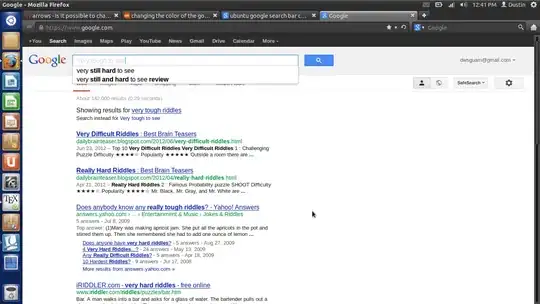
enter image description here

dustin
  • 670
  • 3
  • 15
  • 38
  • Possible duplicate (despite the title): [Make firefox only use GTK theme on browser chrome, but ignore on websites](http://askubuntu.com/q/254479/25656) –  Mar 23 '13 at 16:47
  • @vasa1 Thanks but I can't comment on that question to ask how do I create the chrome folder. – dustin Mar 23 '13 at 16:56
  • That depends on how you want to do so. You can do it through your file manager or by the command line. If you're using the file manager, all viewing of hidden files with control+h. Then look for the folder called `.mozilla`. Then look for your profile folder as described in the other answer. In that folder, right-click anywhere and choose create new folder (as you would in Windows.) Make sure you type everything correctly because the folder and filenames are case-sensitive. –  Mar 23 '13 at 17:04
  • @vasa1 I am using the command line. I brought up cd ~/.mozilla/firefox/87xm9uhi.default took a look at ls and there is now chrome folder. – dustin Mar 23 '13 at 17:06
  • If you mean there is **no** chrome folder, just type `mkdir chrome` from where you are. That should create the folder. –  Mar 23 '13 at 17:10
  • What is the command to make the text file in the chrome file? Thanks. – dustin Mar 23 '13 at 17:12
  • let us [continue this discussion in chat](http://chat.stackexchange.com/rooms/8040/discussion-between-vasa1-and-dustin) –  Mar 23 '13 at 17:13

0 Answers0