1

I’m kinda new to Ubuntu and I’m making a slow but safe progress. I had version 12.04 installed, until i upgraded to 12.10, and than it stopped working. Long story short, I had 5 Ubuntu’s installed - two 12.10, two 11.10 and one 13.04.

I would like to clear up the mess. This is how my HD looks like
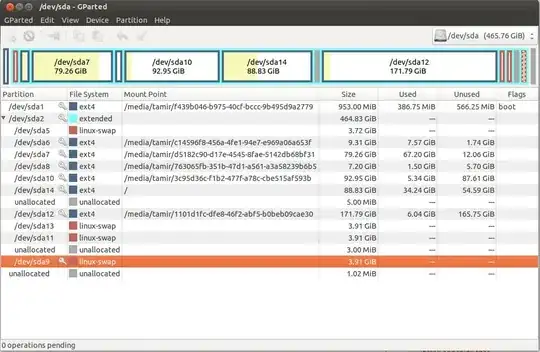
disk partitions

now, I wanted to leave just one 11.10 and the 13.04 so i uninstalled some OS (12.04 x 2 + 11.10 x 1) with OS-uninstaller. However the partitions of those OS are still there. i would like to remove those partitions, and to minimize the 11.10 HD consumption (later on I would like to add a partition for windows). I read some about the partitioning (like https://help.ubuntu.com/community/HowtoPartition) but I’m still not sure what to do.

my questions are 1. How can I know which partition belongs to which OS "instance"? I'm working from the 13.04 and I want to remove all partitions, but the partitions used by the 13.04 and by the 11.10 2. I have 4 linux-swap partitions, can I instruct both OS (13.04+11.10) to use the same space as swap?

thanks a lot tamir

Tom Brossman
  • 12,953
  • 11
  • 66
  • 134
tamir
  • 11
  • 1
  • The current system is the partition mounted at `/`, are all the other ones (mounted at `/media/tamir/*`) older deleted OS partitions? You'll probably need to boot from a LiveUSB or similar to edit your system partition – kiri Sep 07 '13 at 20:59
  • I'm not interested in changing the current OS partition. I wish to remove the ones used by the OS I removed (two instances of 12.04 and one of 11.10) but there should be an operable 11.10 left on the HD. One of the /media/tamir/* probably belongs to the 11.10 still installed (and I want to keep it), I just don't know which one it is. – tamir Sep 07 '13 at 21:06
  • You should try to boot from the 11.10 instance you want to keep then take note of which one is mounted at `/` in 11.10. It looks like it's `/dev/sda7` (used 67.2GiB) – kiri Sep 07 '13 at 21:08
  • You should [look here](https://wiki.archlinux.org/index.php/Swap#Swap_partition) for how to use all your swap partitions – kiri Sep 07 '13 at 21:12

1 Answers1

0

You have several issues here plus several questions in one. Ubuntu 11.10 is officially 'End of life' and unsupported, so off-topic here. There is a high risk of accidentally destroying data when repartitioning, especially to newer users of Ubuntu.

I highly recommend you back up whatever files you want to keep to a different drive (a USB drive you can unplug would be ideal) and then start over. Install 12.04 if you want long-term support or 13.04 if you want the newest features.

Wipe the entire disk, deleting all partitions, then see this related question if you want advice on a partitioning scheme.

Good luck and welcome to Ask Ubuntu!

Tom Brossman
  • 12,953
  • 11
  • 66
  • 134
  • thanks. Actually I already did the next steps - removed unnecessary OS with OS-uninstaller it turned out that somehow I removed the 11.10 I wanted to keep. - booted from live-CD and removed some partitions then i had a grub error when booting - boot from live-cd to fix grub (using http://ubuntuforums.org/showthread.php?t=1014708) it worked (although I get an error message just before Ubuntu loads) I'll probably do what you suggested when installing windows alongside the Ubuntu (my next step). – tamir Sep 08 '13 at 04:41
  • @tamir make sure you install Windows first, or it's [more work](http://askubuntu.com/q/6317/12864). Ubuntu has the more capable installer of the two OSs and so is best run last, to make sure everything works. – Tom Brossman Sep 08 '13 at 11:28