37

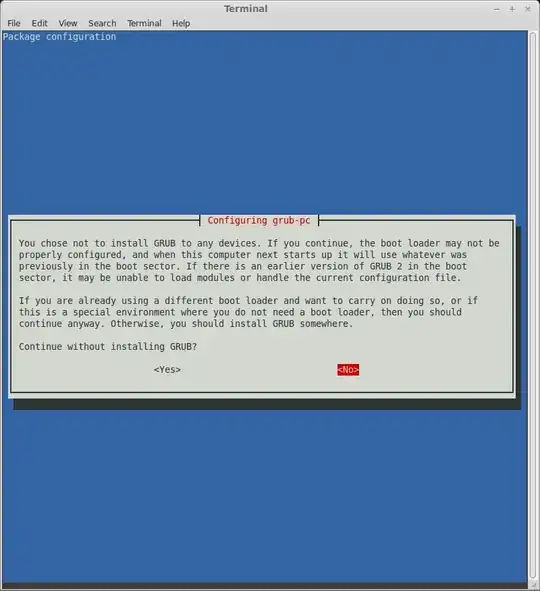
I would like to select /dev/sda in the "Configuration grub-pc" menu that popped up in my terminal while upgrading my distro version. However, I have no idea how to select it! Every key I press either does nothing, or takes me to a second menu that says "You chose not to install GRUB to any devices." How do I select it? Configuration grub-pc menu

When I select <Ok> without selecting an option: enter image description here
kelorek
  • 523
  • 1
  • 5
  • 9

3 Answers3

46

Use [tab] to switch between options, use [spacebar] to select.

thom
  • 7,372
  • 3
  • 24
  • 26
  • 7
    This works, why the spacebar to select though? The dialog doesn't indicate that, did I miss it on an earlier screen? – Kinsa Nov 28 '14 at 14:34
  • 1
    On Ubuntu 18.04 (Bionic Beaver) simply pressing 'up' and 'down' allows you to move through the options but, yes, 'Space-bar' actually makes the selection by appending an '*' to an option on a list. – Wachaga Mwaura Feb 14 '19 at 19:47
  • Upgrading from 18.04 (Lubuntu), the Tab key, or the up and down arrows, moves a red indicator box up or down the drive options for the Grub location. However, it is the Space Bar that places the star symbol "*" to designate your selection. (Kind of a double-step selection.) Finally, press the Enter key to continue the upgrade. – Charles Jun 11 '21 at 07:21
4

Try Tab key,it would help you to select the options.

Select continue without installing grub,and then update your grub by running below command,

sudo update-grub
Avinash Raj
  • 77,204
  • 56
  • 214
  • 254
  • Hitting tab just highlights the `` option, leaving the three options blank. – kelorek Dec 01 '13 at 00:38
  • press ``to install grub all of them.So that no option to select which device. – Avinash Raj Dec 01 '13 at 00:53
  • Read the third paragraph in the screenshot. – Avinash Raj Dec 01 '13 at 00:54
  • I only want to select the first option. See the second screenshot. – kelorek Dec 01 '13 at 01:01
  • if you press on the second screenshot,it will take you to the first one. – Avinash Raj Dec 01 '13 at 01:03
  • @kelorek i tried it,shows the same problem.Then select the continue without installing grub option and update your grub via terminal.My answer also works. – Avinash Raj Dec 01 '13 at 01:15
  • I followed your instructions when upgrading Pop_OS! 19.10 and was able to successfully reboot without issue. According to the terminal, the `sudo update-grub` command performs the same actions as APT does immediately after exiting the grub-pc configuration screen (after having opted to take no action), so I'd guess that running `sudo update-grub` isn't necessary. – Patrick Dark Nov 29 '19 at 21:37
0

Ya, it's not intuitive... You have to hit the SPACEBAR to select the option so it turns into an asterisk (*). You can't just hit enter without the * even though it lets you. If you do it means you didn't select anything which is why it says "you chose not to install"...

rmch
  • 1