47

I've installed PostgreSQL 9.1 and pgadmin3 on Ubuntu Server 13.10.

I configured postgresql.conf with: listen_addresses = '*'

also I configured ph_hba.conf by changed peer connections to md5

Plus I reset the password of postgres by: sudo password postgres

then restarted the service with sudo /etc/init.d/postgresql restart

after that I tried to connect to the default PostgreSQL template database:

sudo -u postgres psql template1

but login failed with this error message:

psql: FATAL:  password authentication failed for user "postgres"

then I tried to login from the pgadmin, which gave me the same error.

I've read here that it might be a password expiry dates bug PostgreSQL user can not connect to server after changing password

but I couldn't solve it coz I cannot login with psql. Does anyone now how to resolve this issue?

EDIT

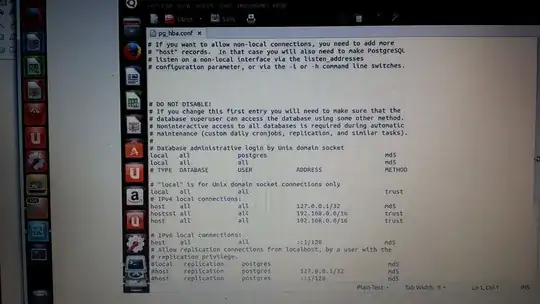
ph_hba file:

here

Screenshot:

enter image description here

karel
  • 110,292
  • 102
  • 269
  • 299
Shadin
  • 1,227
  • 5
  • 14
  • 17
  • 8
    I'm quite irritated by the fact that you have cloned this post. I just wrote an answer to this, only to discover that you also posted an identical question to stackoverflow.com that already had an accepted answer. **Don't copy and paste answers between sites, you're wasting everyone's time** and making it harder to find information. If you insist on doing this, make links between them. – Craig Ringer Feb 01 '14 at 04:34
  • SO link: http://stackoverflow.com/q/21483540/398670 – fossfreedom Feb 02 '14 at 09:50

3 Answers3

87

You are confusing the password for the Unix user "postgres" with the database password for the database user "postgres". These are not the same.

You've locked yourself out, because you enabled md5 authentication for database user postgres without setting a password for the database user postgres.

Add a new line to the top of pg_hba.conf:

local    postgres     postgres     peer

Then restart/reload PostgreSQL:

/etc/init.d/postgresql reload\

and run:

sudo -u postgres psql

From the resulting prompt:

ALTER USER postgres PASSWORD 'my_postgres_password';

remove the line you added to pg_hba.conf and restart Pg again. You can now use the password you set above to connect to PostgreSQL as the postgres user.

To learn more, read the "client authentication" chapter of the user manual and the docs on pg_hba.conf.

BeastOfCaerbannog
  • 12,964
  • 10
  • 49
  • 77
Craig Ringer
  • 5,164
  • 1
  • 23
  • 18
  • 1
    Testing a new pg9.6.6 in a UBUNTU server 16 LTS.... And I was surprised by all these "beginner's problems". Arrive here with the solution... Do step by step ... The big surprise: not working! `psql -W postgresql://postgres:postgres@localhost` producing again same *"FATAL: password authentication failed for user 'postgres'"* – Peter Krauss Nov 22 '17 at 00:41
  • Solution: all lines *trust* is working... – Peter Krauss Nov 22 '17 at 00:52
  • I am using ssh... After puting back all to md5, one by one (local, local, host...), only the line "host all 127.0.0.1/32 trust" can't change, was preserved with "trust". So, new question: why? – Peter Krauss Nov 22 '17 at 01:10
  • the `pg_hba.conf` file is owned by system user `postgres`. I only know the database password of database user `postgres`, So question is how do I edit this conf file without changing its ownership? – Shailen Dec 03 '17 at 20:52
  • Can you tell please, what the line `local postgres postgres peer` really needed for in `pg_hba.conf`? Everything works well without it – MaxCore Sep 07 '18 at 23:38
  • Thanks a lot. This is exactly what my intuition telling me when I came to this problem... – kuntam robo Oct 06 '18 at 06:43
  • Not working db.utils.OperationalError: FATAL: password authentication failed for user "multibot_crm" FATAL: password authentication failed for user "multibot_crm" – Coffee inTime Jun 14 '20 at 16:46
  • @Craig Ringer ..Awesome. It helped me a lot. – user2688323 Oct 10 '20 at 08:26
3

Try to modify the password of the database template1 using this:

$ psql -c "ALTER USER postgres WITH PASSWORD 'yourPassword'" -d template1
pfugazza
  • 66
  • 2
3

in your pg_hba.conf

# IPv4 local connections:
# TYPE  DATABASE    USER        CIDR-ADDRESS          METHOD
host    all         all         127.0.0.1/32         trust

if it does not work then try with

host    all         all         your_ip/32         trust

then restart your data base it will work fine.. if you make trust then there is no need for password if you make MD5 then it will ask password...

stumblebee
  • 2,963
  • 3
  • 16
  • 31
smn_onrocks
  • 526
  • 5
  • 14