7

A .deb package is very easy to install, just like .exe in Windows, simply double click and install via USC. I wonder why some developers choose formats like .tar.gz (it scares the hell out of me) which is complicated to install.

Probably not all Linux forks are compatible with .deb; is it so?

Why Linux community does not set some standard for package management so that each and every software can be in .deb format(I love this format because of its simpleness to install) and ultimately end users will be benefited.

Radu Rădeanu
  • 166,822
  • 48
  • 327
  • 400
waqar
  • 767
  • 1
  • 10
  • 19
  • 7
    You may be wrong if you think that all Windows installers come with `.exe` extension. – Radu Rădeanu Mar 26 '14 at 18:23
  • I just use apt-get to install my packages, i've used tar.gz for like. Two programs ever. It's not o big problem... – Alvar Mar 26 '14 at 18:24
  • Never seen an .msi file have you? :+ – Rinzwind Mar 26 '14 at 18:40
  • Most programs are open source which means the developer should also provide the source code of the program. Most of the time `.deb`s are binary packages hence the `.tar.gz` would be necessary, from a legal point of view, even if no one uses it to actually install the program. Also sometime people want to compile with different compiler flags etc and this may require using the source code directly. – Bakuriu Mar 26 '14 at 20:06
  • 1
    If it were complicated, it would have died long ago. You're incorrectly assuming that if _you_ are not accustomed to it, then it is complicated _for others_. – ignis Mar 26 '14 at 23:06
  • 3
    Alas, Linux does have standard package formatS. That plural makes [all the difference](https://xkcd.com/927/). – Gilles 'SO- stop being evil' Mar 26 '14 at 23:50
  • 2
    I cannot tell if you're just naive in asking your question or are making wild assumptions that just b/c you do not understand something that it's inherently overly complicated or bad vs. what you know. RPM works perfectly fine just as DEB files work perfectly fine. Choice is not a bad thing. Based on your logic when I walk into the hardware store there should only be one kind of hammer to go with the 100's of different nails available. Would that make any more sense? I think not! – slm Mar 27 '14 at 00:54
  • @slm I presume that there will be one hammer for the only kind of nail which you have to use in the only one material available :P – Braiam Mar 27 '14 at 04:27

5 Answers5

19

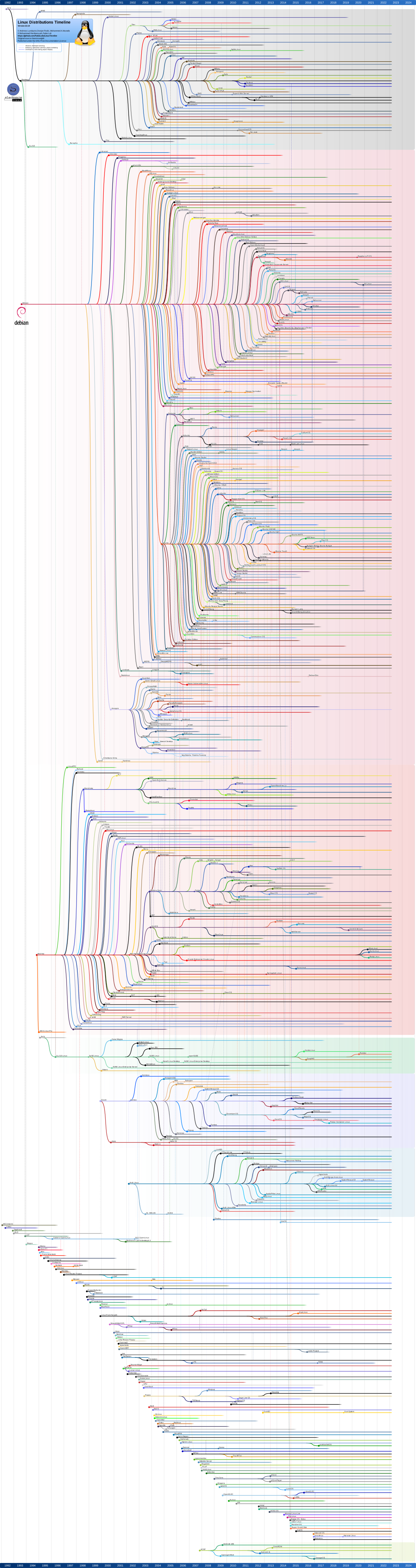
This is because the Linux ecosystem contains many many different sub branches (click on the image for a larger version)1:

enter image description here

Now, one of the basic differences between these distributions is the package manager they use. Debian and its derivatives (one of which is Ubuntu) use dpkg which deals with .deb packages. The other large player is the RedHat Package Manager (rpm) which works with .rpm packages. Other distributions have their own system or use a wrapper to install directly from source or even have no package manager at all.

In any case, the .tar.gz format is

  1. Not actually a format. That is what is known as a compressed tarball. tar creates archives (.tar) which are then passed through gzip to compress them (.gz). See here for more details.

  2. Not an installer. It is just a collection of files/directories, in the case of source tarballs, the source code of a program.

  3. Not in any way specific to source codes or programs. You can think of .tar.gz as an equivalent to Windows (and not only) .zip files. They can contain an installer or they can contain word documents or whatever else.

The reason why all Linux programs are not packaged as .deb files is because while .deb is indeed popular, it does not work for all distributions. Therefore, a developer can either attempt to package their app for as many distributions as they can or simply make the source code available and let users compile it themselves. Up until a few years ago, the vast majority of Linux programs were only distributed in this way. The variety of pre-packaged programs was quite small.

This has changed in recent years with the huge increase of popularity of the .deb format, which was largely due to the corresponding popularity of Ubuntu and Linux Mint.

The reason why not everyone uses .deb is that each approach (dpkg/apt-get, rpm/yum, pacman etc) has its diehard fans. And if I only release my program as a .deb not everyone will be able to use it. The only way to make sure that any GNU/Linux user will be able to use my software is to release it as source and let them compile it manually.

As a final note, you really shouldn't be scared of such programs. While it is true that sorting out the dependencies can be a pain, most devs will clearly state the dependencies on their webpage and as long as you have them installed, installing software from a source tarball is really quite easy:

  1. Extract the file

     tar xvzf software.tar.gz
    
  2. Move into the newly created directory where the files were extracted

     cd software/
    
  3. Configure

     ./configure
    
  4. Compile

     make
    
  5. Install

     sudo make install
    

This can all be condensed to:

tar xvzf software.tgz; cd software; ./configure && make && make install

1 Image taken from this Wikipedia page.

Archisman Panigrahi
  • 25,210
  • 17
  • 90
  • 185
terdon
  • 98,183
  • 15
  • 197
  • 293
  • @orangedoc thanks for catching the typos but your "simplification" of the `tar` was wrong. The `-` is not needed, the `v` is indeed optional but useful so you know what's going on and the `z` is essential for `tgz` files. – terdon Mar 26 '14 at 19:06
  • 1
    You can often do a `make test` before the `make install` to be sure that everything went okay in the compilation step. – Bakuriu Mar 26 '14 at 20:08
  • @Bakuriu yes, very good point but I didn't want to clutter the answer (more). On the other hand, `make && make install` ensures that the install will only be run if the make exited with `0` status. – terdon Mar 26 '14 at 20:19
  • +1 for the graph. Although I am sure I used a version of Slackware *before* 1992 --- at least a couple of years before. – Rmano Mar 26 '14 at 20:36
  • 1
    @Rmano how? Seems doubtful but theoretically possible I guess. The kernel only came out on the [17 September 1991](https://en.wikipedia.org/wiki/Linux_kernel), were you maybe using a slackware with a Unix kernel? – terdon Mar 26 '14 at 20:40
  • @terdon Ok --- got the dates wrong, probably 1992, yes. So much time --- it was probably an SLS; I remember clearly a .99pl. Worked on Ultrix at that time; I have the Ultrix->Linux transition a bit blurry. Sure I did have a Linux laptop (an Olivetti!) when writing my Ph.D. thesis in 1993 --- in plain TeX. ;-) – Rmano Mar 26 '14 at 20:45
  • @Rmano nice! You win, I wrote mine on a linux laptop too but it was using LaTeX and a gui editor (`emacs`). – terdon Mar 26 '14 at 20:47
  • "not an installer" - Arch uses `.tar.xz` (LZMA4) as its package format ;). and I believe Slackware uses `tar.gz`s, but don't quote me on that. – strugee Mar 27 '14 at 04:53
  • 2
    @strugee stop yanking my chain. You know as well as I do that 1) `tar.xz` is not `tar.gz` 2) It is not an installer anyway, it is an archive and pacman installs it 3) Tarballs can contain whatever they like. – terdon Mar 27 '14 at 04:55
  • @terdon `make` exit with status 0 doesn't necessarily mean that everything works as it should. It already occurred to me that for (e.g.) some version mismatch in some libraries etc there were problems after the program was installed, although compilation didn't yield any error/particular warning. – Bakuriu Mar 27 '14 at 07:20
  • @Bakuriu OK, but would make test have seen that? If the compilation completed successfully but you had errors when executing, presumably make test would have been succesful as well right? – terdon Mar 27 '14 at 07:24
  • 1
    @terdon In my experience `make test` *does* find out that something isn't working, but it depends on the quality of the test suite. Anyway, `make test` can also help when the use of a given library is suggested but not required. `make test` usually shows that the tests were skipped and why they were skipped so you have a chance to install the given library before installing the program (and thus take advantage of the optional features). – Bakuriu Mar 27 '14 at 09:13
8

Actually there are alternatives to .deb packages

.deb packages stands for debian packages. It was started by the Debian Linux Distribution

Another major player is rpm which stands for RedHat package manager

Linux relies on open source. So most of zipped file like .tar.gz are source codes

You have to compile and run on any linux distribution like so:

tar -xvf yourdownloadedpackagefilename.tar.gz
cd yourdownloadedpackagefilename
./configure
make
make install

Note: you should carefully read the README file because not all source packages behave the same way!

This is not the case when dealing with package managers. They depend on the distro.

Hope that helps

I found this quote very helpful defining the difference between package managers:

Both these groups are "package managers" which greatly simplify the process of installing, updating, otherwise maintaining, and removing software. The "deb" files are for use by the "dpkg" utility that originated with the Debian distro (of which Ubuntu is a variant) and the "rpm" files are for the RedHat Package Manager, a similar but very different utility that originated with the Red Hat distribution.

Before package managers came into use, installing a new piece of software was a complicated process that turned off many non-geeks. You had to locate its source code, then compile and link that source into an executable binary file. The first attempt to do so usually resulted in a long string of error messages about missing library files -- for which you had to search, install, and repeat the process.

The package manager utilities made it possible to list all these "dependencies" within a single file that also included a description, and the ready-to-run binary program file. The package manager takes care of fetching all the needed dependencies, and also handles initial configuration of the new software.

While the two different types of manager do essentially the same job, their files are not directly interchangeable. A utility does exist for converting RPM files into the DEB format, but there's no guarantee that a converted RPM file will automatically configure things properly for the Debian standards of file location (which differ significantly, in some respects, from those of Red Hat and its descendants).

I hope this helps a bit; not all distributions use package managers, so if you want to learn more about the "old ways" you can try things like Slackware or GenToo! That may tell you more than you'll be comfortable learning

kirchberger
  • 824
  • 1
  • 7
  • 17
7

Really, because the question is wrong.

Is like to ask "why I can buy cakes and flour, eggs, sugar too? It's so easier to just eat the cake, why someone sells all that other things too?"

.deb are packages with (normally) compiled programs that someone compiled, installed, configured and adapted to a specific operating system. Someone took care of dependencies, side effects, etc. Note that .deb format is used by Ubuntu and several other distributions, like debian, Mint, etc... and even if you can install a debian .deb in Ubuntu and often it will work, is not guaranteed so. Other distributions have different packaging systems (rpm, pacman, even .tar.gz for slackware).

.tar.gz is a compressed, archived set of files. Think .zip. It could be whatever. A software, a photo collection, source code, compiled code, even a package for a distro, you name it.

Rmano
  • 31,627
  • 16
  • 118
  • 187
4

As explained in the Debian FAQ:

Packages generally contain all of the files necessary to implement a set of related commands or features. There are two types of Debian packages:

Binary packages, which contain executables, configuration files, man/info pages, copyright information, and other documentation. These packages are distributed in a Debian-specific archive format they are usually distinguished by having a '.deb' file extension. Binary packages can be unpacked using the Debian utility dpkg and possibly via a frontend like aptitude.

Source packages, which consist of a .dsc file describing the source package (including the names of the following files), a .orig.tar.gz file that contains the original unmodified source in gzip-compressed tar format and usually a .diff.gz file that contains the Debian-specific changes to the original source. The utility dpkg-source packs and unpacks Debian source archives. The program apt-get can get used a frontend for dpkg-source.

terdon
  • 98,183
  • 15
  • 197
  • 293
Tasos
  • 432
  • 1
  • 3
  • 8
2

This is because the .tar.gz includes the source code, so that you can poke around, if you'd like. Plus, this also gives the developers a chance to give you a README

Don't let them scare you - all you have to do is read the INSTALL file that typically comes bundled (or is otherwise in the README) --

usually, it's simply:

./configure
make
make install

and voila !

Alvar
  • 16,898
  • 29
  • 91
  • 134
rm-vanda
  • 3,146
  • 3
  • 21
  • 27