22

I'm getting sick and tired of VLC. The issues are too many to mention in detail, but generally: bugs (ballooning out of memory on fake/exotic movies, leftover windows, many others) and the ergonomics that would be more appropriate for a 1995 application.

Are there any good alternatives? Things that are important to me: resources usage footprint, formats supported, ergonomics.

MattDevTech
  • 438
  • 2
  • 5
  • 9
  • 4
    If you have problems with VLC you might have that problem with all other players: if so ... most likely you are having problems with your graphics card and it would be wiser to focus on that. Did you try the default movie player? – Rinzwind May 29 '11 at 13:20
  • 7
    Am not against any alternative for VLC but if the years using many players has tought me something is that if it does not work with VLC then am 100% sure it will not work in any other player. VLC might not come by default in Ubuntu, Windows, Mac OS or any other operating system but it sure beats the hell out of all of them. So much so that i always install VLC when i install Windows or Ubuntu and i always put it as the default. This way i ensure less problems with other players. Have had 0 complaints since 2003. Now my question would be, what version are you using since Themes are available. – Luis Alvarado May 29 '11 at 15:45
  • I'm generally a big fan of VLC for being able to play most things out of the box, but I've run into plenty situations where other players have better/more reliable performance with demanding codecs (the same file that sporadically locks up VLC on my netbook plays nice with totem, etc.) so *upvote* – Dorkus1218 May 29 '11 at 18:32
  • Can you tell us in detail what the problems are? From your description it sounds a bit like a shady question without a clear answer. – RolandiXor May 29 '11 at 20:03
  • 1
    @CYREX, I disagree. Tried to play 1080 HD video on Windows and Ubuntu, tearing and lag every few seconds. And one more effect I don't know how to describe. Basically unwatchable. But MPlayer rocked - as simple as that. – Oxwivi May 30 '11 at 07:46
  • Did you change some of the Video Options in VLC. I mean it has several options to reduce output lag and many others. For a 1080HD i have played 3 right now on a full 42' LED Screen and with ALL players it has had the tearing effect which suggest it is my video card. I managed to play around with VLC options and lower the tearing effect to 1 every 15 minutes agains for example mplayer that happened everytime a lot of things were happening in the movie. Tearing normally suggest video card update/upgrade. I have an Nvidia 9500, can the user asking and you post what video card you have – Luis Alvarado May 30 '11 at 14:39
  • is this still up to date? last versions of VLC work great –  Oct 30 '14 at 09:38

7 Answers7

30

smplayer (based on mplayer) plays all formats known to mankind and is easy to use. It also has unique features such as remembering the position in a movie when you close it.

loevborg
  • 7,152
  • 1
  • 27
  • 24
4

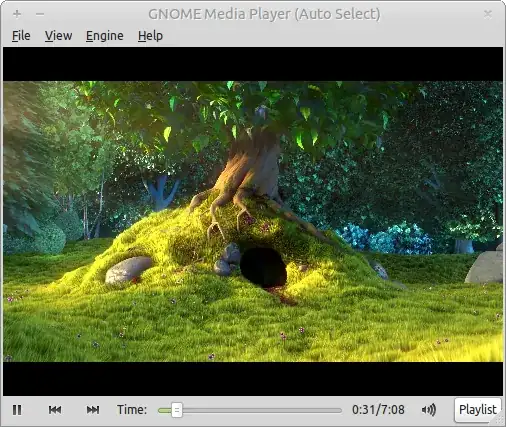
GNOME Media Player install gnome-media-player

GNOME media player is a fairly simple media player that fits well into the GNOME desktop.

gnome-media-player playing Big Buck Bunny

It runs on multiple backends (vlc, gstreamer and xine) which means it can play almost every media format. By default it tries to pick the backend that works best for what you are playing. It doesn't have as many features as some other players but it has a simple interface and from my experience plays well.

dv3500ea
  • 36,816
  • 13
  • 99
  • 152
3

If you are fine with Movie Player/Totem (Ubuntu's default media player) or Banshee, you can simply install the codec packages (and their dependencies) to play all the formats:

sudo apt-get install gstreamer0.10-ffmpeg gstreamer0.10-fluendo-mp3 gstreamer0.10-pitfdll gstreamer0.10-plugins-bad gstreamer0.10-plugins-bad-multiverse gstreamer0.10-plugins-ugly gstreamer0.10-plugins-ugly-multiverse

PS I use this instead of the ubuntu-restricted-extras because I want only the codec packages. The restricted meta-package contains some fonts, OpenJDK and codecs.

EDIT I checked just now, ASS/SSA issue I mentioned before is no longer applicable.

Oxwivi
  • 17,589
  • 53
  • 136
  • 197
1

mplayer is at least as good as vlc. There is a terminal option "mplayer" equal to "cvlc" and different GUIs on top of it.

719016
  • 6,087
  • 30
  • 80
  • 117
1

Xine is very good player, I prefer mplayer though

jet
  • 7,134
  • 1
  • 23
  • 27
1

I've recently switched to miro version 4 ( http://www.getmiro.com/download/for-ubuntu/ ) from VLC, for aesthetic reasons, and I'm liking it. It is open source, has a modern look and manages my video library nicely with thumbnails,etc. RAM usage is slightly higher, but CPU usage seems to be the same.

Simon B
  • 1,238
  • 10
  • 16
0

https://appimage.github.io/QMPlay2/

https://discourse.appimage.org/t/how-to-run-an-appimage/80

Download the QMPlay2 AppImage and make it executable using your file manager or by entering the following commands in a terminal:

chmod +x ./*.AppImage

mr pix
  • 1
  • 3