1

How can I make the monitor settings be saved after reboot?

I have configured my monitor on my Lenovo T410S like this:
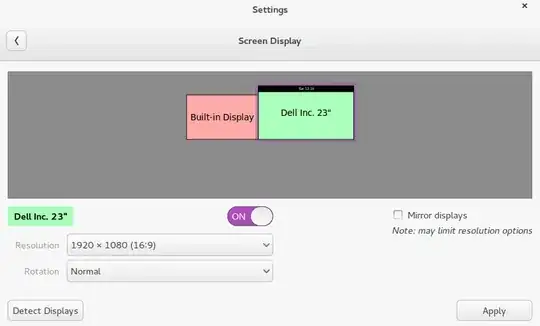
enter image description here

after reboot its however reset to this:

enter image description here

Interestingly, my monitor.xml looks the way I wanted it:

<monitors version="1">
  <configuration>
  <clone>no</clone>
  <output name="LVDS1">
      <vendor>LEN</vendor>
      <product>0x4036</product>
      <serial>0x00000000</serial>
      <width>1440</width>
      <height>900</height>
      <rate>60</rate>
      <x>0</x>
      <y>180</y>
      <rotation>normal</rotation>
      <reflect_x>no</reflect_x>
      <reflect_y>no</reflect_y>
      <primary>no</primary>
  </output>
  <output name="VGA1">
  </output>
  <output name="HDMI1">
  </output>
  <output name="DP1">
  </output>
  <output name="HDMI2">
  </output>
  <output name="HDMI3">
      <vendor>DEL</vendor>
      <product>0x4067</product>
      <serial>0x3134374c</serial>
      <width>1920</width>
      <height>1080</height>
      <rate>60</rate>
      <x>1440</x>
      <y>0</y>
      <rotation>normal</rotation>
      <reflect_x>no</reflect_x>
      <reflect_y>no</reflect_y>
      <primary>yes</primary>
  </output>
  <output name="DP2">
  </output>
  <output name="DP3">
  </output>
  <output name="VIRTUAL1">
  </output>

Sina
  • 1,033
  • 10
  • 21
  • possible duplicate of [Multi display issue with Ubuntu GNOME 14.04](http://askubuntu.com/questions/450767/multi-display-issue-with-ubuntu-gnome-14-04) – Sina May 15 '14 at 14:09
  • I think its a duplicate of another issue (http://askubuntu.com/questions/450767/multi-display-issue-with-ubuntu-gnome-14-04). Just flagged it. – Sina May 15 '14 at 14:10

1 Answers1

1

xorg.conf is where you can make persistent changes. It should be saved in /etc/X11/xorg.conf

An example of the server layout portion would be something like

Section "ServerLayout" Identifier "seat0" Screen "screen0" 0 0 Screen "screen1" 1920 0 InputDevice "mouse0" "CorePointer" InputDevice "keyboard0" "CoreKeyboard"
EndSection

Where screen1 is 1920 pixels to the right of screen0. Your screen0 and screen1 will also have to be configured. You can do so by running sudo X -configure when there is no X session (recovery mode can do this) and then save the xorg.conf.new file. When you have a configuration you would like to test, write it to /etx/X11/xorg.conf. Don't forget to backup your working xorg.conf if you have one.

Mr.Lee
  • 891
  • 6
  • 11
  • To identify the screens do I need to write `LVDS1` instead of `screen0`? – Sina May 14 '14 at 15:45
  • I don't think so. Screen0 is just the name you give to what points to the monitor and driver for the monitor. Did you do the `sudo X -configure?` [Xorg manual](http://www.x.org/archive/X11R6.8.0/doc/xorg.conf.5.html) – Mr.Lee May 14 '14 at 16:33
  • Hm. I went to recovery mode and chose `root shell prompt`. When I typed `sudo X -configure` it failed because it couldn"t create a lockfile. Any other way I can access this? – Sina May 15 '14 at 14:05
  • Thanks @Mr.Lee there is another workaround. I marked this question as duplicate. – Sina May 15 '14 at 14:13