10

My Xubuntu (Ubuntu 13.10) task bar currently looks like this:

Taskbar screenshot

I'd like to be able to rearrange them in a different order. Say for example, I want Google Chrome to be listed first. But I'm not able to drag them and arrange it in the preferred order. It used to be possible in the Ubuntu versions I've used before.

How can this be done?

Amal Murali
  • 737
  • 10
  • 22
  • 1
    See if [this answer](http://askubuntu.com/questions/280692/how-do-i-reorder-buttons-in-the-window-list-taskbar-via-drag-and-drop) is of any help to you. – Taz D. May 21 '14 at 14:53
  • @floppy: I don't see such an option when I right-click on an empty space in the taskbar. I see [this window](http://i.stack.imgur.com/U098N.png) instead. – Amal Murali May 21 '14 at 15:12
  • LOL, you clicked on the separator which is also present on the taskbar and it opened the menu for the separator which can be TRANSPARENT, HANDLE and so on. In your case, the Separator is Transparent so you did not see it. Change it to handle to avoid clicking it again. Then right-click somewhere in the middle section of the taskbar and choose Panel Options. Or you can go to Start - Settings, open the all settings window and look in there for Panel Options. – Taz D. May 22 '14 at 11:13

2 Answers2

12

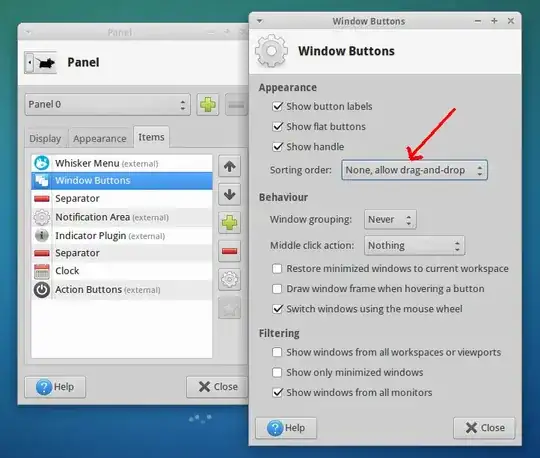
It should be possible with this configuration:

enter image description here

TuKsn
  • 4,330
  • 2
  • 26
  • 43
1

As of Xubuntu 18.04, to manually rearrange the position of taskbar tabs:

Settings > Panel > Item > Window Buttons > Edit the currently selected item (5th button from top) > Sorting Order > None, Allow Drag and Drop.

krkart
  • 541
  • 4
  • 8