5

I have a polygon in the following format:

[813,1623],[816,1623],[818,1617],[823,1626],[831,1626],[832,1629],[839,1632],[841,1636],[837,1636],[842,1640],[839,1632],[835,1631],[831,1624],[827,1621],[827,1618],[830,1620],[838,1619],[838,1618],[832,1608],[839,1605],[841,1599],[846,1596],[848,1589],[853,1588],[855,1585],[851,1579],[853,1577],[848,1574],[837,1574],[836,1568],[835,1573],[830,1573],[829,1571],[821,1571],[827,1577],[832,1577],[822,1582],[827,1584],[827,1590],[832,1591],[833,1596],[829,1598],[831,1601],[826,1601],[826,1598],[822,1600],[825,1605],[819,1603],[820,1611],[817,1610],[820,1616],[816,1615],[816,1621],[813,1619],[813,1623]

Are there any applications I can convert this and edit it, i.e. Inkscape?

Kohjah Breese
  • 2,701
  • 10
  • 24
  • 32

1 Answers1

12

You could manually make an SVG fairly simply in a text editor. It's not a hard language.

<svg height="2000" width="2000">
    <polygon points="..." style="fill:white;stroke:black;stroke-width:1" />
</svg>

So that's the base document. You'd replace the ... with a space-separated list of coordinates. I just used a text-editor's find-and-replace function on your list and ended up with something like this:

<svg height="2000" width="2000">
    <polygon points="813,1623 816,1623 818,1617 823,1626 831,1626 832,1629 839,1632 841,1636 837,1636 842,1640 839,1632 835,1631 831,1624 827,1621 827,1618 830,1620 838,1619 838,1618 832,1608 839,1605 841,1599 846,1596 848,1589 853,1588 855,1585 851,1579 853,1577 848,1574 837,1574 836,1568 835,1573 830,1573 829,1571 821,1571 827,1577 832,1577 822,1582 827,1584 827,1590 832,1591 833,1596 829,1598 831,1601 826,1601 826,1598 822,1600 825,1605 819,1603 820,1611 817,1610 820,1616 816,1615 816,1621 813,1619 813,1623" style="fill:white;stroke:black;stroke-width:1" />
</svg>

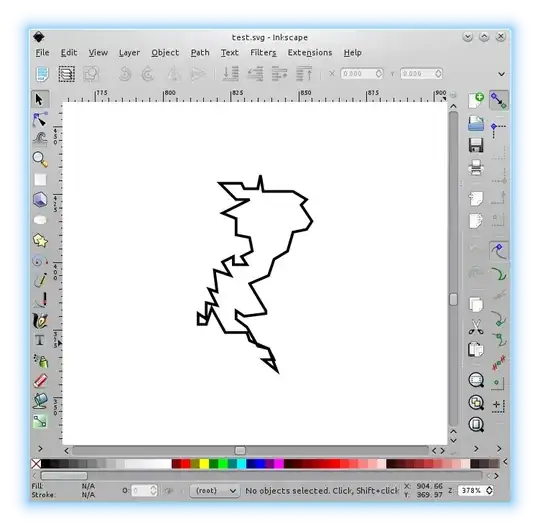
Then you can open that in Inkscape and export it as whatever you like:

enter image description here

Oli
  • 289,791
  • 117
  • 680
  • 835