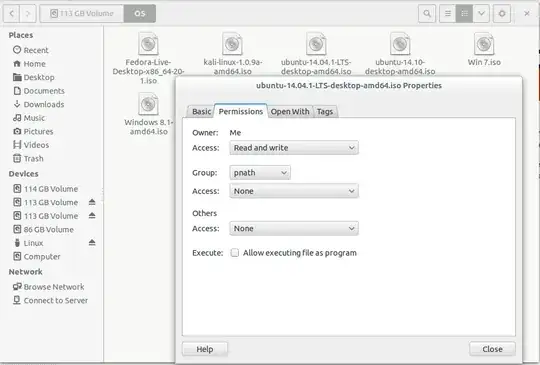
 Why I can't change permission of any files which are located on other partitions like sda2,sda3,sda4 and so on.. When I change it from properties it's immediately change again to it's previous setting.. When I tried with nautilus... it shows
Asked
Active
Viewed 77 times
0

Purnendu Nath
- 234
- 3
- 5
- 16
-
did you try chmod – Anıl Karaağaç Nov 21 '14 at 12:54
-
Yes !! But same... – Purnendu Nath Nov 21 '14 at 12:58
-
2What is the filesystem type on the devices (not all filesystems support Unix-style permissions)? How are they mounted? – steeldriver Nov 21 '14 at 13:01
-
It's NTFS and automatically mounted.. – Purnendu Nath Nov 21 '14 at 13:08
-
check that http://askubuntu.com/a/11843/179030 – Anıl Karaağaç Nov 21 '14 at 13:09
1 Answers
0
This is probably because you don't have sufficient privileges to change the permissions in the first place.
Try pressing Alt+F2 and then entering gksudo nautilus. Once you've entered your password, the file browser (nautilus) should launch, and you should be able to change those permissions.
You can also do this from the terminal (Ctrl+Alt+T) and running the chown command.
Eg: sudo chown [USER]:[USER] /media/USER/FOLDER/FILE

RPiAwesomeness
- 9,723
- 21
- 71
- 104
-
-
-
-
-
@PriyankaNath I believe the answer linked to by Anıl Karaağaç [here](http://askubuntu.com/questions/11840/how-do-i-use-chmod-on-an-ntfs-or-fat32-partition) should solve your problem. Since the partition is an NTFS partition, the normal Unix/Linux file permissions don't apply, since it's a Windows filesystem. – RPiAwesomeness Nov 21 '14 at 13:42