2

I am trying to boot Ubuntu 14.10 64 bit on my Alienware 14 (HD 4600/GTX 765M, i7-4700MQ, 8GB RAM) and this is what appears.

I'm guessing this is an issue with my GPU? How can I get this to work? I'm guessing there's one of those boot parameters I could change to get this working?

user98348
  • 135
  • 1
  • 2
  • 13
  • possible duplicate of [My computer boots to a black screen, what options do I have to fix it?](http://askubuntu.com/questions/162075/my-computer-boots-to-a-black-screen-what-options-do-i-have-to-fix-it) – Panther Nov 27 '14 at 03:32
  • also check the md5sum of the iso – Panther Nov 27 '14 at 03:32
  • @user98348 Two questions need to be answered before I can supply a good answer. 1. What Bios Settings Are you using? 2. How did you create the live usb? – user175999 Nov 27 '14 at 04:47
  • I am using the UEFI BIOS, if that's what you mean. I created the USB with [Linux Live USB Creator](http://www.linuxliveusb.com/) – user98348 Nov 27 '14 at 07:39
  • I recomment using 14.04. I also have some issues using 14.10 with my GTX 780 and also with virtual box. – davidbaumann Dec 06 '14 at 14:34

1 Answers1

3

First do a MD5 hash check of the ISO to verify it.

In case the ISO is valid, you may be facing an issue because of your GPU, ie Nvidia GTX 765M.

Try the following to make it work.

  1. As soon as you boot from the USB, press any key to enter the splash screen.

  2. Press F6 and select the nomodeset option
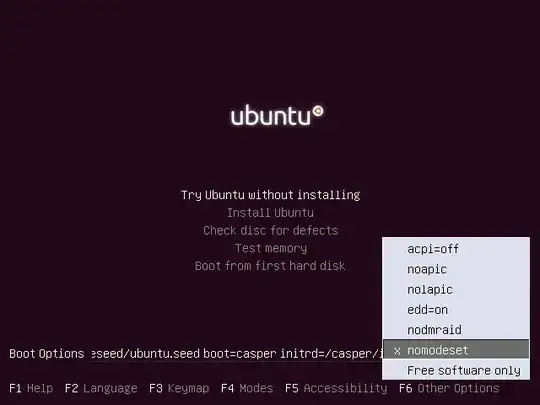
enter image description here

  1. Now select Try Ubuntu without installing option and check whether the problem persists.

  2. In case nomodeset does not work, try either acpi=off or nolapic options and try again.

ALTERNATIVELY, you can edit the /boot/grub/grub.cfg on your live USB and add the nomodeset option.

Edit :

What is nomodeset?

The newest kernels have moved the video mode setting into the kernel. So all the programming of the hardware specific clock rates and registers on the video card happen in the kernel rather than in the X driver when the X server starts.. This makes it possible to have high resolution nice looking splash (boot) screens and flicker free transitions from boot splash to login screen. Unfortunately, on some cards this doesnt work properly and you end up with a black screen. Adding the nomodeset parameter instructs the kernel to not load video drivers and use BIOS modes instead until X is loaded.

Note that this option is sometimes needed for nVidia cards when using the default "nouveau" drivers. Installing proprietary nvidia drivers usually makes this option no longer necessary, so it may not be needed to make this option permanent, just for one boot until you installed the nvidia drivers.

Source

Rohith Madhavan
  • 8,229
  • 5
  • 24
  • 43
  • But this is a UEFI boot, so the screen you show is not what is in use. User will need to edit the grub boot commands in text mode and add the options. – ubfan1 Dec 01 '14 at 06:27
  • Alright, I got it to boot just fine by using nomodeset. When I install nvidia-prime and the proprietary NVIDIA drivers, I will be able to boot without nomodeset, right? – user98348 Dec 02 '14 at 05:09
  • Yes. I have edited the answer also accordingly. – Rohith Madhavan Dec 02 '14 at 07:40