In the new version of Ubuntu, I cannot find the application to reverse the color of my screen. It has been in the Ubuntu 10, when I pressed the button Win+M or Win+N, the color of the whole screen would be reserved. What's the name of that application. Can I find it in new version?
Asked
Active
Viewed 5,703 times

1 Answers
23
Compiz method
Its a Compiz plugin,
Firstly install ccsm if you havent already
sudo aptitude install compizconfig-settings-manager
Then go to
System > Preferences > CompizConfig Settings Manager

Tick the plugin Negative. If it is not listed, then install the compiz-plugins package, and reopen CCSM:
sudo apt-get install compiz-plugins

Now it should work
But in Natty, You will face a problem, Pressing Ctrl+M Brings up the messaging menu
So the key association of the Negative Plugin should be reassigned to another combination
To do that:
Click the Name of the negative plugin
You should encounter such a page
 Click the key combinations and change them to something else
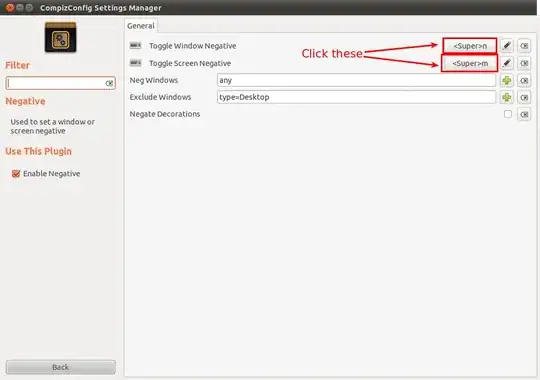 Now it will work
Non Compiz method
Either you can use
magnifier -z 1 -fi
or
sudo apt-get install xcalib
/usr/bin/xcalib -invert -alter;

-
Anyway to do the above steps without installing CCSM? – Oxwivi Aug 12 '11 at 10:39
-
@Oxwivi I think so there is a command backend for Compiz. – Amith KK Aug 12 '11 at 10:54
-
1`man compiz` does not say anything about how to enable plugins... – Oxwivi Aug 12 '11 at 11:39
-
@Amith kk It seems that the negative cannot be enabled after I do what mentioned in this post. – Aug 13 '11 at 07:51
-
1Also, remember to run `sudo apt-get install compiz-plugins` in case you don't have the compiz-plugins package already installed for some reason. – Julian Mar 08 '14 at 19:57