Is there a good image editor application for Ubuntu with which I can convert jpg/png images into WebP format? ImageMagick was a crap for me! With it, output webp image's size just increased!!!
Asked
Active
Viewed 1,883 times


3 Answers
5
There is a plugin for the Gimp that provides the ability to load and export WebP images. You can install the package (gimp-webp) from this PPA:
ppa:george-edison55/webp
(Click here for instructions on using PPAs.)
The commands for doing this would be:
sudo add-apt-repository ppa:george-edison55/webp
sudo apt-get update
sudo apt-get install gimp-webp
Once the package is installed, open up the Gimp and you will now be able to export images to the WebP format:
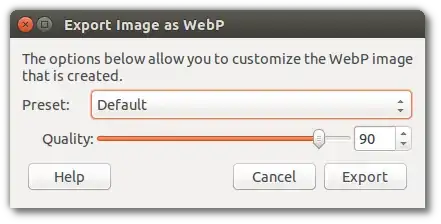
The package is currently available for Trusty, Utopic, Vivid, and Wily.
Disclaimer: I am the author of the plugin.


Nathan Osman
- 31,915
- 40
- 179
- 259
-
Since v2.9 GIMP [comes with WebP support](https://www.gimp.org/news/2017/08/24/gimp-2-9-6-released/#webp-support) (thanks to Nathan and others) – Pablo Bianchi Jun 21 '21 at 06:05
2
16.04 Fixed
Since 16.04 imagemagick (or convert) does support webp, although it delegates to webp, so you need to install webp.
sudo apt-get install webp
But importantly things like convert img.png img.webp do work now.
Before 16.04 convert simply gave a png or jpg as output. The result wasn't a webp format. (You probably got bigger filesizes because it converted jpg with default (higher) quality)
Thumbnails:
display 'vid:*.webp'

Janghou
- 5,499
- 6
- 43
- 59
1
There is a webp package in Software Center by which you can convert GIF to WebP via commandline.
Also there's a paint for KDE, KolourPaint, which can save images as WebP.

AliNajafies
- 5,732
- 4
- 30
- 38