I used to be able to switch to Nvidia by going to software sources. Now when I click the driver for my graphics card it downloads, turns green and it looks like its using the correct driver but when I go to system details it says its using my Intel graphics. The performance is accordingly average... But I have gfx card with 2G of dedicated memory! Is there a way I can do this? Possibly something in grub? Or even better: graphics card switching without need for reboot? Something like: https://gfx.io/?
Asked
Active
Viewed 3,870 times

1 Answers
4
If you have nvidia prime installed just go to nvidia x server settings and choose it in prime profile (you need to relog to apply the changes).
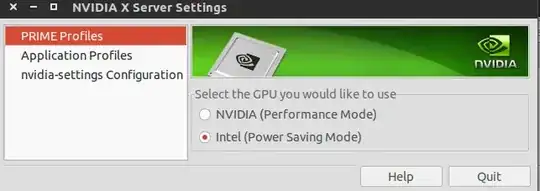
To install prime:
First make sure bumblebee not installed! Or just remove it:
sudo apt-get purge bumblebee*
Install:
sudo apt-get install nvidia-prime
You can also install prime-indicator for easier switching.
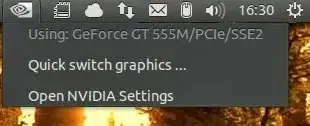
sudo add-apt-repository ppa:nilarimogard/webupd8
sudo apt-get update
sudo apt-get install prime-indicator
If you prefer to use bumblebee/have it installed you have to run the application with a command to use the video card (advantage: you don't need to relog).
optirun <program-name>
To install bumblebee make sure you remove prime! More info: https://wiki.ubuntu.com/Bumblebee

guyromb
- 433
- 2
- 12
-
for some reason **this** happens: [link](http://imgur.com/3o0SbN6) – Eliáš Bauer Apr 17 '15 at 13:15
-
1I recommend you to remove all and re-install: `sudo apt-get purge bumblebee* nvidia*` Then install: `sudo apt-get install nvidia-331 nvidia-settings nvidia-prime` – guyromb Apr 17 '15 at 13:55
-
Also go to settings -> Software & Updates -> Additonal drivers -> Choose "using nvidia binary driver ... (prop, tested)" – guyromb Apr 17 '15 at 13:58
-
I reinstalled exactly as you said and this is a screenshot of my "additional drivers" list http://imgur.com/e64JFXN but i still get that blank error :/ – Eliáš Bauer Apr 17 '15 at 15:08
-
I found this but not sure which solution is best for me... Any advice? Or should i try them all? http://askubuntu.com/questions/450154/nvidia-331-nvidia-settings-prime-profile-switching-error – Eliáš Bauer Apr 17 '15 at 15:20
-
I tried everything on the list except reinstalling ubuntu :( I dont want to reinstall ubuntu _AGAIN_ ! :( Any ideas @guyromb ? – Eliáš Bauer Apr 17 '15 at 15:35
-
@EliášBauer Do you have Nvidia Optimus enabled in the BIOS of your computer? – Sean Apr 17 '15 at 15:49
-
@Sean how do i do that? – Eliáš Bauer Apr 17 '15 at 21:13
-
@EliášBauer To entire the BIOS you need to start with the computer off then hold a certain ket down as the boot starts. The key differs by manufacturer, `F1` or `DEL` are often used, it should say on your screen at boot time. In the BIOS look for a graphics category to find the Optimus setting. – Sean Apr 18 '15 at 17:48
-
@Sean There is no such option in my bios :/ – Eliáš Bauer Apr 27 '15 at 09:39
-
In the end i reinstalled a frech copy of ubuntu GNOME 15.10 and everything works perfectly – Eliáš Bauer May 12 '15 at 09:29