When I'm going to install the Google Chrome,it says on the Ubuntu Software Center that Dependency is not satisfiable: libappindicator1
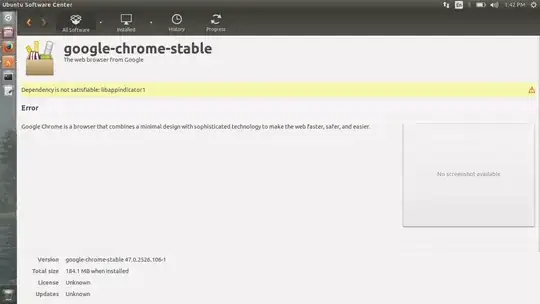
When I'm going to install the Google Chrome,it says on the Ubuntu Software Center that Dependency is not satisfiable: libappindicator1
Ok first of all update Ubuntu's software repositories by using the command after opening the terminal
sudo apt-get update
After that download the .deb file of google chrome from here
https://www.google.com/intl/en-US/chrome/browser/desktop/index.html
After that just double click the downloaded file it should open the Ubuntu software Center and the installation will take place.
I think it should work.Try it once..:) After the installation you can open google chrome using the command in terminal
google-chrome-stable

You can try apt-get --no-install-recommends install pkgname. This installs without suggests.. You can install the suggests (dependencies) for a single package installation by using apt-get -o APT::Install-Suggests="true" install pkgname.


