2

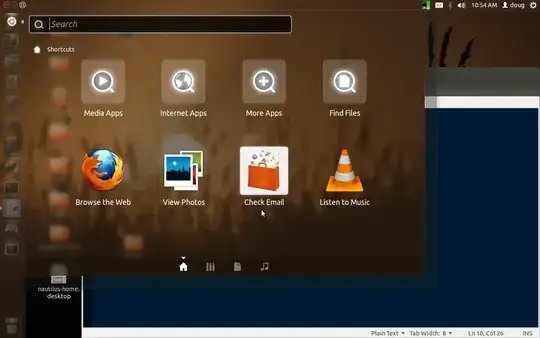
I removed all the icons in the sidebar because I'd like it to act more like a taskbar than a program dock. However, I now find it annoying that I must type "Software Center" into the Dash search bar whenever I wish to open it.

I thought it would be a good idea to put it right in the Dash home somewhere. Since I don't use Thunderbird, I thought to replace that icon with the Software Center. But as an Ubuntu Novice, I've got no idea on how to go about doing this.

Additional info:

My Dash home currently reads:

Media Apps-Internet Apps-More Apps-Find Files

Browse the Web-View Photos-Check Email-Listen to Music

I'd like it to say:

Media Apps-Internet Apps-More Apps-Find Files

Browse the Web-View Photos-*Software Center*-Listen to Music

Any way to accomplish this? Thanks.

Ubuntu 11.10

Alexand3rS
  • 315
  • 2
  • 7
  • There does not seem to be a way to do this in 11.04 according to [this answer](http://askubuntu.com/questions/34182/can-i-edit-which-icons-appear-in-the-unity-dash/37721#37721) on a related question. Whether this is now possible in 11.10, I'm not sure. Which Ubuntu version are you using? – Knowledge Cube Oct 31 '11 at 08:24
  • 1
    Sorry, I'm using 11.10. I'll edit it into the question. – Alexand3rS Oct 31 '11 at 08:39

1 Answers1

2

Note - I don't particularly recommend this -

The "Check Email" is coded in, can only be changed in source.

If you did wish software-center to be used instead then you'd need to change the default handler for mail to software-center (mailto) which extends to more than just what happens when clicking on an icon.

If inclined to check out then open ~/local/share/applications/mimeapps.list & add this line in the [Default Applications] section (or edit to if already there

x-scheme-handler/mailto=ubuntu-software-center.desktop

A log out/in may be neededenter image description here

Can be reset to default in System Settings > System info > Default...

doug
  • 16,848
  • 2
  • 45
  • 60