How to copy complete content on terminal to a text file using commands .
Asked
Active
Viewed 1.5k times
6

-
I unserstand you want to copy the output of *previous* commands right? Not the output of yet to be run commands. – kos Apr 24 '16 at 18:55
-
Are you working inside `screen` or `tmux` (maybe using `byobu`)? – JanC Apr 24 '16 at 19:14
3 Answers
2
You can use script. It will basically save everything printed on the terminal in that script session.
From man script:
script makes a typescript of everything printed on your terminal.
It is useful for students who need a hardcopy record of an
interactive session as proof of an assignment, as the typescript file
can be printed out later with lpr(1).
You can start a script session by just typing script in the terminal, all the subsequent commands and their outputs will all be saved in a file named typescript in the current directory. You can save the result to a different file too by just starting script like:
script output.txt To logout of the script session (stop saving the contents), just type exit.
Here is an example:
$ script output.txt
Script started, file is output.txt

$ ls
output.txt  testfile.txt  foo.txt

$ exit
exit
Script done, file is output.txt
Now if I read the file:
$ cat output.txt

Script started on 2020-07-23 09:57:16+05:30
$ ls
output.txt  testfile.txt  foo.txt
$ exit
exit

Script done on 2020-07-23 09:57:34+05:30

Cheris Patel
- 41
- 1
2
You can use screendump.
As in the man page:
screendump - dump the contents of a virtual console to stdout
You'll need root privileges to run screendump, so use sudo.

Mahdi
- 1,457
- 1
- 13
- 22
1
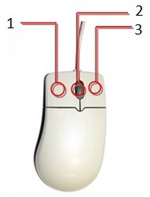
As far as terminal emulators go ( GUI ) you can select the text with mouse and switch to text editor ( be it gedit or anything else ) and press Ctrl + Button 2 ( Scroll wheel on mouse and Right+Left click on touchpad )
With TTY you could use cat /dev/vcs1 to dump contents of TTY1.
Best approaches , however, should use terminal multiplexers such as screen , tmux, byobu or use script command to record the whole session to file.


Sergiy Kolodyazhnyy
- 103,293
- 19
- 273
- 492