120

Does anyone have any good ideas as to native MySQL GUI clients for Ubuntu?

So far I've tried MySQL Workbench, which never seemed to work properly, phpMyAdmin which I found a bit slow, and Navicat which is a windows port and runs under wine, but none of these is perfect. In an ideal world, I'm looking for something like a native version of navicat.

Bruni
  • 10,180
  • 7
  • 55
  • 97
richzilla
  • 11,935
  • 17
  • 51
  • 63
  • 5
    MySQL Workbench probably is the only *native* MySQL GUI Client for Linux. – Marco Ceppi Oct 18 '10 at 19:51
  • What version of Workbench did you try? A lot of the RC versions were unstable. – Marco Ceppi Oct 18 '10 at 20:31
  • The thing is, MySQL Query Browser and Administrator are far more friendlier than Workbench. To do simple tasks or very precise ones in Workbench I need to do too many steps. In Query Browser I just open it, go directly to the DB and start working. Same for Administrator. Much more friendlier. I rather use (in my opinion) mysql console than workbench until the actually make it friendlier (And also start working on a .DEB version of 5.5.x and 5.6 instead of only rmp and us having to do many steps to get it working. – Luis Alvarado Dec 01 '11 at 16:15
  • Please only recommend one software product per answer, folks! If you want to recommend more than one, post more than one answer. That way, we can upvote each answer separately. – Flimm Sep 05 '22 at 07:04

12 Answers12

69

Sadly, you can't find these in the Ubuntu Software Centre in later versions of Ubuntu any more. This is because these two pieces of software have reached their end-of-life, and are no longer supported.


MySQL Workbench Install mysql-workbench is probably the most complete tool, but a bit sluggish according to me.

I prefer "MySQL Query browser" and "MySQL Administrator". These two can do all basic stuff, and are very user friendly.

Screenshot

Glorfindel
  • 965
  • 3
  • 13
  • 20
W. Goeman
  • 1,580
  • 10
  • 12
  • I've been using them for years. Nice, lightweight and useful. – Javier Rivera Oct 19 '10 at 08:07
  • In my opinion for administrative and DML task phpmyadmin it's a better and easier tool. – neuromancer Nov 04 '10 at 13:24
  • 4
    phpMyAdmin is a very nice tool indeed, but it requires running an HTTP server with PHP enabled. MySQL is not only used for web projects. – W. Goeman Nov 04 '10 at 21:33
  • Note that MySQL Workbench requires oracle login. – BillMan May 06 '13 at 17:29
  • some of the most complete tools, but still the market is poor ... Valentina studio is superior in terms of dumping , quick export/import, still both of them have trouble with documented databases ... – Decebal Jan 22 '14 at 15:50
  • @BillMan You are incorrect (at least at time of writing); The link to bypass the oracle account buttons is near the bottom of the page and reads "No thanks, just start my download." – ThorSummoner Dec 24 '14 at 23:08
  • 1
    I've stumbled upon this answer because at the moment MySQL workbench is broken in Ubuntu 14.10 https://bugs.launchpad.net/ubuntu/+source/mysql-workbench/+bug/1385147 – Greg Jan 08 '15 at 16:51
  • The best for me in ubuntu – Luitame Feb 06 '15 at 00:29
41

I like Emma. Emma is an open source project that isn't developed by Oracle.

Emma is available from the Ubuntu repositories in older versions of Ubuntu. Run:

sudo apt install emma

In newer versions of Ubuntu, Emma is no longer available in the Ubuntu repositories. See this question.

Screenshot

Flimm
  • 40,306
  • 22
  • 94
  • 154
jet
  • 7,134
  • 1
  • 23
  • 27
  • In Gnome Ubuntu 13.04, Emma crashes often for me. I moved to using [Eclipse SQLExplorer](http://eclipsesql.sourceforge.net/index.php) as an Eclipse plugin. – Eyal Jun 13 '13 at 13:09
  • Crashes even more often than MySQL Workbench. – Eduard Luca Sep 17 '13 at 12:12
  • Works amazingly for me. I love it. Workbench on the other hand is slow and always causing me issues. – Gerry Oct 23 '13 at 06:47
  • I've been using Emma for years, though it did crash some time ago but not anymore. It's for simple data viewing and minor editing tasks, for something more complex I use and recommend MySQLWorkbench – DivinesLight Mar 10 '15 at 07:54
  • Awesome! Thats what I want, a light tool because i'm not doing anything too heavy. – Edson Horacio Junior Sep 10 '15 at 12:59
  • 1
    how to start emma after installation? in shell when i type emma, it shows you need to install emboss – sprksh Jan 31 '17 at 06:22
  • Disadvantage found: when I click on table name, to list table data, emma tries to execute SELECT query. But it forgets to quote table name, so I get a syntax error, since one of my tables name is `function` – Bogdan Burym Jul 24 '17 at 18:10
22

I use a free tool Valentina Studio, is FREE, works on 32/64 bit Linux, Windows and Mac OS X. Is the best way to transform your data into meaningful information; create, administer, query and explore Valentina DB, MySQL, Postgre and SQLite databases http://www.valentina-db.com/en/valentina-studio-overview enter image description here

ahmad dhaybi
  • 321
  • 2
  • 3
8

GUI tools that have not been mentioned here, that I know work under Linux without WINE:

Disclosure: I work for Ocelot.

Flimm
  • 40,306
  • 22
  • 94
  • 154
Peter Gulutzan
  • 209
  • 2
  • 3
  • 1
    No disrespect to you and your team but the UI for ocelot looks absolutely horrid. I mean.. does that software even fall in the same category as all the others? You are suppose to write your own SQL? That is what all the other applications are trying to avoid. Again.. no disrespect, I am sure a lot of effort has been put in the program... but man.. the UI is really really bad – AntonioCS Feb 04 '19 at 11:39
  • We will not respond to the above because we believe this is not the right forum for arguing about design choices. But feedback is welcome via methods stated in our readme file. – Peter Gulutzan Feb 25 '19 at 20:55
  • You take what you can get – AntonioCS Feb 26 '19 at 21:09
  • For many reasons, I will recommend DBeaver. – Saeid Dec 26 '19 at 08:47
  • It would be much better to have a separate answer for each one of these tools, so we can upvote them separately. – Flimm Sep 05 '22 at 07:00
6

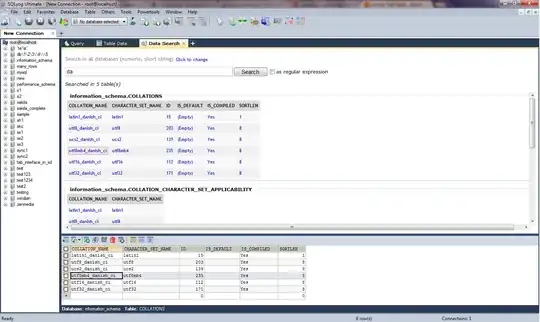
I know the answer is already accepted but I felt I should add SQLYog to this list anyway since it is such a powerful tool... There is no official build available for Linux but it works quite well on Wine.

SQLyog Datasearch screenshot

jsist
  • 257
  • 1
  • 2
  • 11
Nikhil
  • 249
  • 1
  • 3
  • 8
5

I'm definitely late to answer here, but a friend and I were fed up of the overcomplicated Java Swing apps, so we built our own open source SQL editor & Database manager. It's 100% Open source - MIT licensed.

It's really modern compared to many of those listed here, but doesn't have as many advanced features, so it is not as well suited for DBAs, but it's GREAT for regular developers.

Beekeeper Studio

enter image description here

Hope someone else likes using it as much as I do!

  • Nice project! It seems, though, that it can't create new databases, which is on of the features I'm looking for. – Paulo Coghi Dec 07 '20 at 10:31
5

I use Adminer. It's very lightweight and with a clear web interface. It's an alternative to phpMyAdmin.

https://www.adminer.org

Adminer Sceenshot

It can be installed like this:

sudo apt-get install adminer
sudo a2enconf adminer
sudo systemctl reload apache2

Then open http://localhost/adminer

But if you want newer versions you should install manually:

https://www.vultr.com/docs/install-adminer-on-debian-ubuntu

Flimm
  • 40,306
  • 22
  • 94
  • 154
Eyal Levin
  • 541
  • 7
  • 13
4

Another alternative is Tora (an opensource Qt multi-platform application).

enter image description here

Jaime M.
  • 380
  • 4
  • 13
1

MySQL workbench does work on Ubuntu 11.xx but it will hang at some of the loading splash screens. You just need to use Alt+F4 to close the splash window and it will continue.

Oyibo
  • 1,909
  • 5
  • 23
  • 40
1

dbeaver (https://github.com/serge-rider/dbeaver) is good option aswell, i would disadvice mysql workbench because it is really unstable (on 16.04 and 14.04)

Wouter
  • 291
  • 1
  • 5
0

I solved this problem with the following method (I used to install quanta+ 3.5 in ubuntu 12.04. In the same repositories you can find mysql gui tools):

The tutorial is in this blog article.

Follow the tutorial, and replace:

sudo apt-get install quanta

with:

sudo apt-get install mysql-query-browser mysql-admin

but maybe it is mysql-gui-tools, but i'm not sure.

yQy
  • 11
  • 3
    Hello, yQy, welcome to AskUbuntu! I'm afraid I downvoted your answer. The linked blog article is not in English, and isn't very useful. Furthermore, it's always recommended that answers include the answer, and only provide links for further information. – Flimm Dec 06 '12 at 19:27
0

One possibility is using SQLExplorer, either as an Eclipse plugin or a standalone "RCP" application. I use it as a plugin, but you can download a Linux standalone version, too. To start the standalone version extract it and execute the sqlexplorer file.

It's being actively developed (last version was in April 2013) and for many people IDE integration is a plus.

Eyal
  • 4,955
  • 5
  • 29
  • 43