1

I just got a new computer (W520, Graphics card nVidia GF106 [Quadro 2000]) and installed ubuntu on it using wubi. I have everything working, so I wanted to set it up to be able to use two monitors with an extended screen. I figured I had to edit Xorg.conf, but the file didnt exist. So I tried to create it by booting in recovery mode, and executing

 Xorg -configure

but I am getting these errors:

(EE) Failed to load module "vmwgfx" (module does not exist, 0)
(EE) vmware: Please ignore the above warnings about not being able to load module/driver vmwgfx
(++) Using config file: "/root/xorg.conf.new"
(==) Using system config directory "/usr/share/X11/xorg.conf.d"
(EE) [drm] No DRICreatedPCIBusID symbol
Number of created screens does not match number of detected devices.
    Configuration failed.
  ddxSigGiveUp: Closing log

Any idea how I can get Xorg -configure to work, so that I can have an xorg.conf file that I can edit to enable twinview?

Why can't I boot with an xorg.conf file generated by nvidia-xconfig? Is there something in the generated xorg.conf file that might need editing?

I have an nVidia Optimus technology which seems like it precludes me from running Unity 3d. Can I have dual monitors while running unity 2d?

Braiam
  • 66,947
  • 30
  • 177
  • 264
TJ Shah
  • 167
  • 3
  • 9
  • Is this W520 a Lenovo Laptop? Are you able to Run unity 3d? if so you should just use the Nvidia X Server Settings configuration application – itnet7 Dec 01 '11 at 00:53
  • Yes it is a lenovo laptop. I'm not positive how to check if I am running unity 3D. $DESKTOP_SESSION is set to ubuntu-2d so I guess I am not running 3d. The nVidia X Server Settings configuration app gives me this error: "You do not appear to be using the NVIDIIA X-driver. Please edit your X configuration file (just run `nvidia-xconfg` as root), and restart the X server." But when I follow these instructions my boot always freezes, and I have to boot in restore mode and rm the xorg.conf file. Presumably the xorg.conf file has the wrong options set, which messes up boot. – TJ Shah Dec 01 '11 at 01:01
  • I'm using also a W520 Notebook. First i would go into BIOS and check if you have disabled the "automatical detection of NV Optimus". (This was my first problem) Now i'm a step forward. I can use dual monitor with the Nvidia X Server Settigns but only if i use the same screen on both monitors. I i'd like to have a 'bigger' screen - this doesn't work. But i don't know why, because with this graphic card it should easily be possible to use two monitors with diffrent screens.... has someone an idea? – benjyacki Dec 05 '11 at 10:49

1 Answers1

2

You shouldn't really need to worry about xorg.conf. You need to install your nvidia drivers. The first thing you need to do is login normally, hit SuperKey and type in: Additional DriversOpen the Additional Drivers. You should see the following:

Addtional Drivers Window

Select the one of your choice, and hit activate. The drivers should download for you, and install. Once the download/installation is complete, it will let you know that you will need to restart.

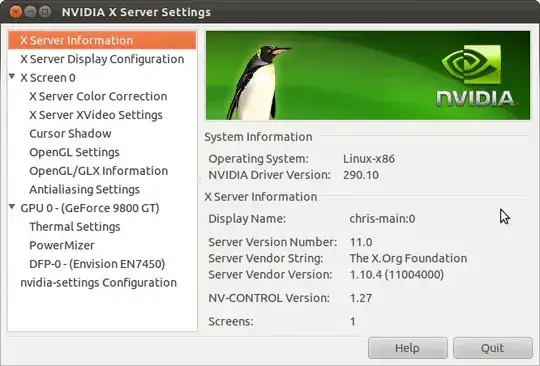
Once restarted you should then have access to the Nvidia X Server Settigns Application. You'll be able to find it by hitting SuperKey again and typing in: nvidia

Nvidia Xserver Settigns Application

You can then go to:

Xserver display configuration option

Hit Detect Displays, Set the Resolution, and Twinview or with one of your displays (whichever you prefer) set to primary.

I have access to a W520 at work. Let me know if this helps or if you need a little more info and I'll try to see what I can do to add more detail.

itnet7
  • 3,479
  • 2
  • 19
  • 20
  • Once your machine has the drivers installed, I believe it will then default to Unity. If not you will need to go to the greeter, and click on the little gear. You will need to select just `Ubuntu` instead of `Ubuntu 2D` – itnet7 Dec 01 '11 at 23:33
  • In my screenshot, The Nvidia Driver that I'm using on the machine I used to make screenshots with is using a PPA for the latest nvidia drivers. Your actual driver numbers will more than likely not match. – itnet7 Dec 01 '11 at 23:36
  • Thanks a lot for the detailed answer, but I think that I have bigger issues. It seems like since I have nVidia optimus, installing drivers is the [last thing I want to do](http://ubuntuforums.org/showthread.php?t=1657660). I posted a new question [here](http://askubuntu.com/questions/84457/nvidia-optimus-unity-3d-and-dual-monitors) – TJ Shah Dec 01 '11 at 23:37
  • Check out this link, They described adding the `ubuntu-x-swat/x-updates` and how to setup up bumblebee (Which is even mentioned in the very top of that forum post that you linked us to. https://bugs.launchpad.net/ubuntu/+source/jockey/+bug/660443/comments/7 – itnet7 Dec 02 '11 at 18:10