8

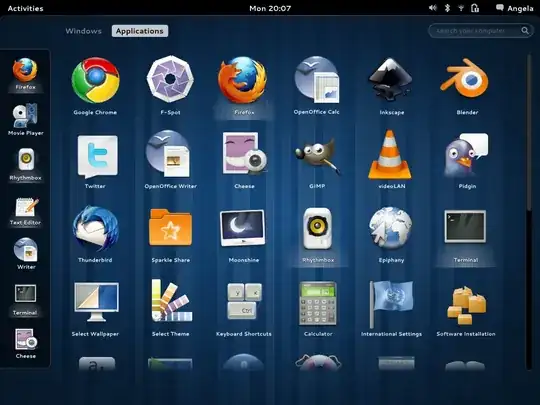
When using Ubuntu 16.04 with the GNOME desktop and pressing the super key it causes an overlay to appear that displays Workspaces, overview of Applications, Application Launcher on the left, and search at the top.

I'm wondering what this feature is called?

pomsky
  • 67,112
  • 21
  • 233
  • 243
Spencer Hill
  • 505
  • 1
  • 6
  • 21
  • See also [terminology \- What are the elements of the GNOME Desktop? \- Ask Ubuntu](https://askubuntu.com/questions/1126811/what-are-the-elements-of-the-gnome-desktop/1261669#1261669) – nealmcb Jul 24 '20 at 12:46

1 Answers1

14

It's generally called the "(Activities) Overview":

Activities Overview

This is a separate view designed to enable users to get an overview of their current activities and to enable effective focus switching (in this regard, the overview is a facilitator and a mediator, not a destination). The top bar continues to be displayed in the overview in order to provide a familiar landmark and visual anchor.

It's composed of:

  • the dash,

  • the window picker,

  • the application picker,

  • the search,

  • the workspace switcher, etc.

We also have a tag for it:

muru
  • 193,181
  • 53
  • 473
  • 722
  • What is [the name](https://askubuntu.com/questions/1126811/what-are-the-elements-of-the-gnome-desktop) of [the Search field and the ensuing window](https://gitlab.gnome.org/GNOME/gnome-desktop/uploads/93d8b4f6472e4eda714d592aba49c7a7/image.png)? Unity calls that the "Dash". Is there a "HUD"? – Dan Dascalescu Mar 19 '19 at 07:08