0

I changed my laptop Hard disk to SSD and then I found a box to convert the HDD to USB. And when I plug it to my notebook it doesn't show. Please help me.

mehman@HP:~$ lsblk
NAME   MAJ:MIN RM   SIZE RO TYPE MOUNTPOINT
sda      8:0    0 931,5G  0 disk 
├─sda1   8:1    0     1K  0 part 
├─sda3   8:3    0 687,4G  0 part 
├─sda5   8:5    0  19,1G  0 part [SWAP]
└─sda6   8:6    0 225,1G  0 part /
sr0     11:0    1  1024M  0 rom

mehman@HP:~$ dmesg | tail
[  308.959810] xhci_hcd 0000:00:14.0: Timeout while waiting for setup device command
[  314.335813] xhci_hcd 0000:00:14.0: Timeout while waiting for setup device command
[  314.543822] usb 3-1: device not accepting address 6, error -62
[  314.543873] usb usb3-port1: unable to enumerate USB device
[ 1830.932266] usb 3-1: new high-speed USB device number 7 using xhci_hcd
[ 1831.052285] usb 3-1: device descriptor read/64, error -71
[ 1831.280280] usb 3-1: device descriptor read/64, error -71
[ 1831.509791] usb 3-1: new high-speed USB device number 8 using xhci_hcd
[ 1831.628330] usb 3-1: device descriptor read/64, error -71
[ 1831.856278] usb 3-1: device descriptor read/64, error -71
mehman@HP:~$ 

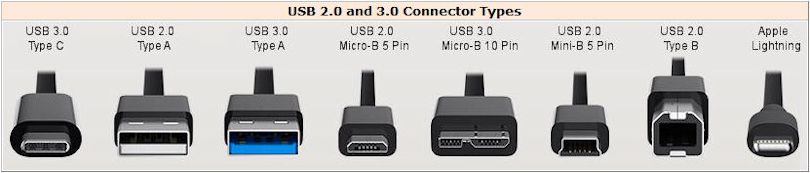
Case looks like this . Case has USB 3.0 Micro-B 10 pin and other side is USB 2.0 Type A output.

but HDD is Samsung hm641ji 640 GB

I tested it on 3 laptops with usb and a PC. It only works when I connect it inside the laptop or PC.

Samsung hm641ji says DC +5V 0.85A Maybe USB-B is not enough?

  • Edit your question with the output of `lsblk` and `dmesg | tail`. – nixpower Jan 03 '18 at 22:01
  • You may want to also specify what type of USB enclosure it is just in case it's relevant but the above two command outputs are most important. – thomasrutter Jan 03 '18 at 23:22
  • Did you try another port, another machine? Does the box have an optional power input? Did you try a USB Y connector (to allow power to be furnished from two USB ports)? Maybe the box just needs more power then one port can supply. – ubfan1 Jan 03 '18 at 23:28
  • Maybe you should check the following links, it will also be useful if you could explain with more details your situation: - [How to install Ubuntu on portable external Hard Drive?](https://askubuntu.com/questions/446682/how-to-install-ubuntu-on-portable-external-hard-drive) - [Dual boot with External Hard disk](http://Dual%20boot%20with%20External%20Hard%20disk) Hope it helps. – galoget Jan 03 '18 at 21:19
  • I updated the information – Mehman Camalov Jan 04 '18 at 17:23

1 Answers1

0

With your disk taking 850ma, and the case taking something, you are at or over the limit of USB3 power supply (900 ma). I'd use an external USB 5v power supply on the case (the round hole), to supply the necessary power. Possibly a Y USB connector (two USB3 A male to the micro B) would enable the necessary power to be drawn off two USB 3 ports on the computer, but that may depend upon how things are wired up inside the computer.

ubfan1
  • 17,041
  • 4
  • 39
  • 47