5

During my attempt to route audio from the system to a audio device that has the system audio and mic audio, I now have many audio devices that I wish to remove, the un-installers on the programs didn't seem to do anything.
Any clue? I've seen similar questions asked but non seem to help.
Thanks if there's an answer! :D
The pictures below are my audio preferences. I wish to remove the 'Sound Siphon', the 'Aggregate device' (From sound flower I believe.) And the 'Mic spam.'
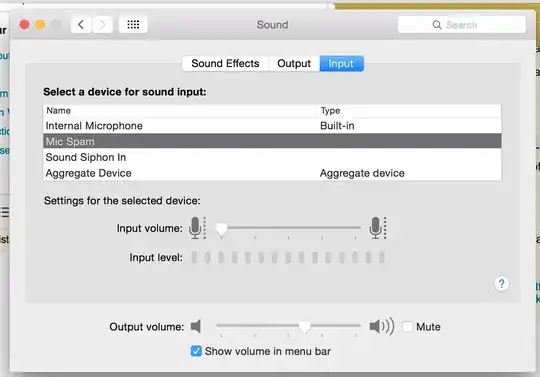
Input.

Output.

Tetsujin
  • 47,296
  • 8
  • 108
  • 135
  • Pro Tip: Hitting spacebar after Cmd/4 allows you to neatly save just the chosen window, complete with snazzy drop-shadow on transparent background. – Tetsujin Dec 06 '15 at 14:24
  • 1
    Generically, you remove devices the same way as you added them, in Audio Midi Setup. That will deal with the Aggregate device, but I've no idea what Sound Siphon is. – Tetsujin Dec 06 '15 at 14:25
  • Google says the uninstaller is here - http://staticz.com/download/2185/ – Tetsujin Dec 06 '15 at 14:27
  • Thank you! Glad to have gotten rid of them! And thanks for the screenshot tip, I did it once and never new how ^-^ Also, out of curiosity, I noticed you did this sound design stuff a lot. Would you know how to put the Microphone and the audio that would generically go to your headphones together. So I could have a device with say me speaking and the music or whatever's going on on my computer. –  Dec 07 '15 at 16:03
  • Best way I know of to do 'non-pro' audio routing, i.e. not ASIO or ReWire, is using Audio Hijack, by Rogues Amoeba. I did an answer at http://superuser.com/questions/939839/mac-how-to-record-voip-phone-call-microphone-and-output-simultaneously/939857#939857 - but watch out for that user's pitfall, which is that whatever comes out of the speakers goes back down the mic… simple law of physics ;-)) Less problems with a headset. – Tetsujin Dec 07 '15 at 16:34
  • Also this one - http://apple.stackexchange.com/questions/203004/nice-audio-mixer-repeater/203009#203009 - showing some sample routings – Tetsujin Dec 07 '15 at 16:35
  • having the same issue with Apowersoft, any suggestions? https://stackoverflow.com/questions/70266538/how-to-permanently-delete-a-virtual-audio-device-from-macos-sounds-preferences – SuperAtic Dec 11 '21 at 11:00

1 Answers1

-1

Sound Siphon can be removed using it's maker uninstaller here:

https://staticz.com/support/soundsiphon/uninstall/

Sam N
  • 11
  • 1