57

Windows 10 includes an option to Reset this PC which can be accessed in Settings → Update and Security → Recovery.

When you choose to reset, you're given some options:
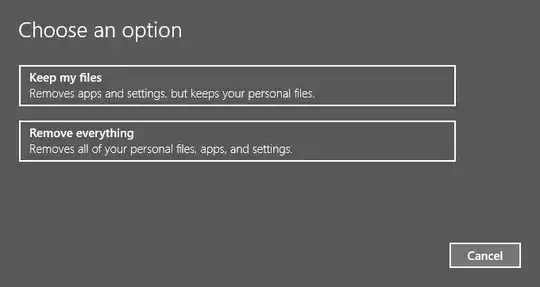
Options to reset

The "Keep my files" option says it "keeps your personal files", but which files does it actually keep? Personal files could mean files in my Windows user folder, or it could just mean the Documents, Pictures, Music, and Videos folders, or it could mean everything that's not Windows.

Sometimes I need folders without spaces in the path, so I store (important) files directly in the C drive. Are these saved as "personal files"?

Although I have backups, I'd prefer not to have to use them.

For the purposes of Windows 10 reset, what are considered personal files?

clhy
  • 6,283
  • 8
  • 34
  • 66
gfrung4
  • 1,493
  • 1
  • 11
  • 11
  • Your personal files considered to be any file within your user profile. – Ramhound Jul 05 '16 at 17:56
  • @Ramhound If that is the case, and you know from experience that only those files in the user profile are kept, then post an answer! – gfrung4 Jul 05 '16 at 18:03
  • There already is an answer that has been submitted to the **[existing question](http://superuser.com/questions/1058268/will-windows-10s-reset-delete-my-linux-partitions)**. I don't see the need to submit what basically would be a duplicate answer. – Ramhound Jul 05 '16 at 18:07
  • 1
    [This question](http://superuser.com/questions/1073898/for-the-purpose-of-windows-10-reset-what-are-considered-apps?lq=1), [this question](http://superuser.com/questions/492792/what-do-windows-8-refresh-and-reset-my-pc-really-do?lq=1) and [this question](http://superuser.com/questions/941146/windows-10-will-the-reset-feature-save-appdata) are all relevant questions. – Ramhound Jul 05 '16 at 18:11
  • 8
    I don't consider my question a duplicate of [this](http://superuser.com/questions/1058268/will-windows-10s-reset-delete-my-linux-partitions) one, as that question is about partitions and there is still no definition of "personal files". Nothing there answers my question as posed. Interestingly, [this](http://superuser.com/questions/1073898/for-the-purpose-of-windows-10-reset-what-are-considered-apps?lq=1) is basically identical to my question, but was closed as a duplicate of the aforementioned question _which it is not a duplicate of_. – gfrung4 Jul 05 '16 at 18:17
  • The community thought differently. My point is there are at least 4 questions with detailed answers, that ask what files are deleted, when the Refresh/Reset option is used. So don't need to submit an answer, because, answers already exist. I am also sort of turned off by comments like "then post an answer!" to be honest. – Ramhound Jul 05 '16 at 18:20

2 Answers2

79

Since I could not find the information I was looking for, I did a reset and performed an experiment of my own. I put TEST.txt files in various directories beforehand to see which remained after the reset. The results were mostly what I expected, except files saved to the system drive by the user did remain (even though they weren't in the user profile).

NOTE: Files that are not saved are moved to the C:\Windows.old directory. You can recover files from this directory after the reset. (thanks @LPChip!)

Here's what is and is not saved:

  • Files in your user profile folder (C:\Users\YourName) are saved as expected. It doesn't have to be in a sub-folder (Documents, Pictures, etc) as files saved directly in the profile folder are saved as well.
  • Files in the system drive are saved. That is, files in C:\ (if C is your system drive) and sub-folders that you created there are safe.
  • Despite being in your user profile, AppData is wiped (C:\Users\YourName\AppData). Files there are NOT saved.
  • Files in Program Files, Program Files (x86), ProgramData, and Windows are NOT saved. This is expected because Windows says "apps" are removed. Windows will make a list of programs removed and put it on the Desktop for you after the reset.
  • Files stored directly in the users folder (C:\Users) and not in a specific user profile are NOT saved.
  • The Public user profile (C:\Users\Public) is NOT saved.

I believe this information is not present elsewhere on this site, and hope that it may be useful to others who are contemplating using the Windows 10 reset feature.

Run5k
  • 15,723
  • 24
  • 49
  • 63
gfrung4
  • 1,493
  • 1
  • 11
  • 11
  • 4
    This is not entirely true. Windows moves the files to c:\windows.old – LPChip Jan 19 '17 at 12:29
  • 1
    @LPChip Are you sure? I was under the assumption that `windows.old` was only created when you did an upgrade, not a reset. Searching around the Internet for a bit, I can't find any reference that mentions `windows.old` with the reset feature. If you're sure, I'll edit my answer so it's accurate. I don't want to reset my computer again just to test it, so if you confirm it, I'll take your word for it! If you have a reference though it'd be better. – gfrung4 Jan 19 '17 at 14:13
  • 1
    I did a reset, keep files and windows moved my files there. Yes I am sure. – LPChip Jan 19 '17 at 14:14
  • @LPChip Thanks! I've edited it in. I figured it might have been something you discovered by actually doing a reset. I can't find any mention of it anywhere on a Microsoft website! If you haven't already deleted them, can you leave those files around and see if they're deleted after 28 days? That's what Microsoft says will happen after an *upgrade*, so I imagine it's similar here. If so, I'd like to add that to the answer as well. – gfrung4 Jan 19 '17 at 14:20
  • I'll check when I get home. I think they indeed get deleted after 28 days. – LPChip Jan 19 '17 at 14:59
  • 3
    Actually strangely a reset keeping user files also remembered my network locations (logged in to WiFi without having to type in password again) and actually reintroduced a permission problem with the DHCP service that I was trying to fix with the reset. – till Mar 19 '17 at 18:15
  • Thanks for a precise answer to a precise question, that's exactly what this community is about. Now if only we could rely on Windows 10v1607 to act exactly the same as 10v1703 ... – Christopher Hostage Aug 10 '17 at 19:35
  • 1
    Did you check the subdirectories of `%UserProfile%\AppData`? – wjandrea Oct 23 '17 at 20:29
  • Thank you for your helpful answer. Is the data inside just the current user's profile saved or inside all user profiles (except Public) saved? – Anthony McGrath Oct 24 '17 at 04:46
  • @wjandrea After the reset, there were still files in AppData, but not the one I put there. I assumed they were the ones that come with a fresh installation of Windows. It is possible that the contents of some subdirectories were saved, but I did not put any files there to test so I would not have noticed. I would guess that the contents is NOT saved. If there's a specific subdirectory you're interested in, make sure everything is backed up (just in case) and do a reset. Come back and report what you saw so it can be added to the answer! – gfrung4 Oct 25 '17 at 14:13
  • @AnthonyMcGrath I only use a single profile on my system, and thus did not check any other profiles. Windows does say "keeps *your* personal files", not "keeps *other people's* personal files", but I would still assume that other profiles are treated just like the current one and kept (except for `AppData`). To help find out, make sure everything is backed up (just in case) and do a reset. Come back and report what you saw so it can be added to the answer! – gfrung4 Oct 25 '17 at 14:16
  • 2
    I tested this in a VM and it seems to be pretty safe in regards to not actually losing any data (that was of relevance to me anyway), everything is either kept as is, or transferred to `Windows.old` folder (including AppData, Program Files etc.). – laggingreflex Feb 08 '18 at 00:22
  • @LPChip Are exe's inside the user's folder saved? Example: Would this `exe` be saved? `C:\Users\xxxxx\Downloads\ChromeSetup.exe` –  Apr 21 '21 at 19:38
  • @AlphaMirage of course. There's no reason why this would be different. The only thing that may be different is whether or not it is moved to windows.old or remains at the current location. If you upgrade the downloads folder has no dependencies (aka installs) so those files can remain in that location. If there are dependencies, they are moved to windows.old – LPChip Apr 21 '21 at 20:20
  • @LPChip Sorry but I am still confused. I am not upgrading. Just resetting. So will the exe stay in the folder or get moved to `windows.old`??? Either way it will still be on my hard drive right? –  Apr 21 '21 at 20:30
  • Yes, it will still be on your harddrive if you choose to keep files. – LPChip Apr 21 '21 at 21:00
  • @LPChip Ok thanks for your help!! –  Apr 22 '21 at 13:09
16

Adding to user1465113's answer and LPChip's answer on a related question, here's a tree.

Legend:

  • 0 removed (i.e. moved to C:\Windows.old)
  • 1 kept
  • A untested, but I assume removed
  • B untested, but I assume kept
C:                        1
|-- $Recycle.Bin          1
|-- Program Files         0
|-- Program Files (x86)   0
|-- ProgramData           0
|-- temp                  A
|-- Users                 0
|   |-- Public            0
|   |-- %USERNAME%        1
|       |-- AppData       0
|           |-- Local     A
|           |-- LocalLow  A
|           |-- Roaming   A
|-- Windows               0
D:                        1
Recovery                  B
MBR                       A
EFI                       B
|-- Microsoft             A

Contributors:

wjandrea
  • 595
  • 8
  • 19