Can I enable AHCI after installing Windows 7 in a SATA drive that was on IDE mode?
Asked
Active
Viewed 6,557 times
20


1 Answers
23
You need to make the msahci and/or IastorV drivers be loaded early.
(Note: For Windows 10, the built-in driver is called storahci.)
According to Microsoft KB 922976, run Fix it 50470 or open regedit, navigate to one of these keys:
HKEY_LOCAL_MACHINE\System\CurrentControlSet\Services\msahciHKEY_LOCAL_MACHINE\System\CurrentControlSet\Services\IastorV
and set the value of the Start dword to 0.
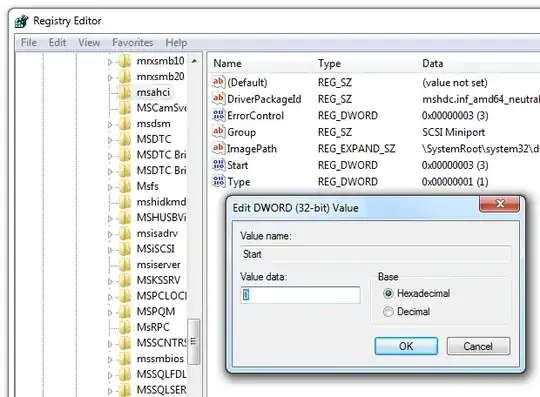
Reboot and enable AHCI in BIOS, now it should work.
Remember to create a restore point before any changes, just in case.
The same registry changes can be done via Cmd, using reg add or sc config:
Check current parameters (and make sure the service exists):
sc qc msahciChange the boot mode:
sc config msahci start= boot(Note that
start=is a single parameter, butbootis separate.)

u1686_grawity
- 426,297
- 64
- 894
- 966

CGA
- 3,809
- 21
- 15
-
1It only worked when I followed your procedure. – Jader Dias Feb 20 '10 at 02:36