First of all check that the pendrive doesn't have a Read-only lock, so you can try to reformat it. There's a free tool called HDD Low Level Format Tool (you can download it from here). Once downloaded, run it, choose your USB and then start the low level format. If it doesn't work, then proceed with the next steps:
[WARNING: This method, as the previous one, will erase EVERYTHING on the device.]
1) Download ChipGenius (a free tool for retrieving the PID and VID of a device).
2) Plug-in your USB and open the program (your device should be autoselected). Take note of the PID and VID of your device (you'll need it later)
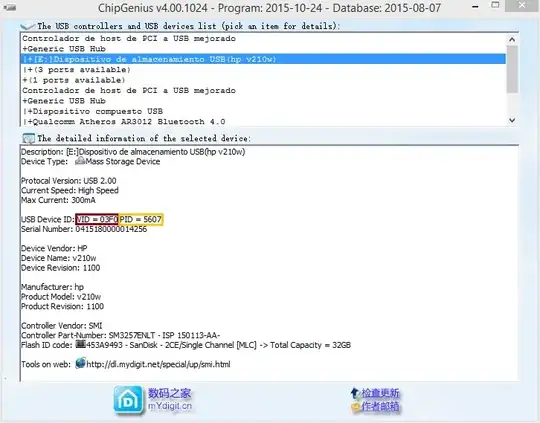 3) Now you need to go to FlashBoot.ru's website, which contains a wide variety of information of USB devices: type the VID and PID in the search fields, after that, look for the UTILS column, which contains the name of the tool (or link to the tool) you need to format your device. The tool you need to choose will depend on the capacity of your device (there's also a SIZE column, and in my case my device is 32Gigs).
 4) As a last step you have to "trial and error": there are several tools so you'll need to find the adequate one.
NOTE: When you've downloaded any tool, un-plug your USB device, run the tool and re-plug your device so the program can detect it.


