-1

I need to determine (at least approximately) a motherboard model.

msinfo32 shows the following info:

System Manufacturer: AOPEN_
System Model: AWRDACPI
System Type: X86-based PC
Processor: x86 Family 6 Model 11 Stepping 1 GenuineIntel ~1300 MHz
BIOS Version/Date: Award Software International, Inc. 6.00 PG, 17.12.2001
SMBIOS Version: 2.2

Sadly, my friend can't run WMIC, Speccy or other tool, because they have no administrator rights.

Is there a way to determine at least approximately the model of motherboard?

My goals are:

  • To determine the maximum supported memory size (to analyze possibility and rationality of upgrade)
  • To determine processor requirements (socket etc to analyze possibility and rationality of upgrade)
Sasha
  • 98
  • 2
  • 16
  • @Ƭᴇcʜιᴇ007, absolutely no. – Sasha Oct 20 '16 at 12:17
  • If you friend is not an admin of the computer, then you shouldn't be speaking with them about hardware changes. Based on the information provided, and the lack ability to gather required information, the answer to your specific question is "No". Easiest answer: Open the computer and look at it. – Ƭᴇcʜιᴇ007 Oct 20 '16 at 12:18
  • @Ƭᴇcʜιᴇ007, he isn't admin. He is employee in the office. Their organization doesn't have budget for upgrade. Their admin allowed to perform upgrade at employee's expense. However, their admin is part-time, thus waiting for his next coming can be too long. – Sasha Oct 20 '16 at 12:23
  • I'm not sure what you expect us to do about that? Unfortunately, if it's a company computer then you need to deal with the company, by their rules. This is why questions about corporate computers (where you are not the admin) are generally off-topic for SU. – Ƭᴇcʜιᴇ007 Oct 20 '16 at 12:28
  • @Ƭᴇcʜιᴇ007, this is absolutely not off-topic. The company **allows** to change hardware. But the employee is interested to acquire maximum info and to make most of decisions without the admin, because admin is coming to the office too rarely. // I expect that experienced administators or former-administrators can extract some useful things even from such poor data. – Sasha Oct 20 '16 at 12:34
  • (I.e. smth like this: "There are wide range of motherboards, which are identified by the `AWRDACPI` code. But the company name `Aopen` allows us to precise the list. The fact that it uses Intel, not AMD processor allows us to precise the list. The fact that it's relatively old motherboard, with old processor and small RAM allows us to precise the list even more. The BIOS version allows us to precise list even more. Thus it's probably one of these models: m1, m2, …, mₙ. At least, the processor socket is almost certainly one of the following: s1, s2.") – Sasha Oct 20 '16 at 12:37
  • So you're basically asking for a list of every AOpen motherboard with an Award BIOS made in the last 15 years... Anyhow, I've said my piece, takes more than my vote to close it, good luck! – Ƭᴇcʜιᴇ007 Oct 20 '16 at 12:39
  • @Ƭᴇcʜιᴇ007, not the last 15 years. See the date (17.12.2001) and the processor model (Family 6 Model 11 1300MHz => Tualatin Celeron). Even myself, being absolutely unexperienced, can now say that's `Socket 370`. – Sasha Oct 20 '16 at 12:49
  • @Sasha, the proposed duplicate has over a dozen answers, most of which do not require admin priviledges. – fixer1234 Oct 21 '16 at 01:34
  • @fixer1234, in that question I see: (1) `msinfo32` and `dxdiag`, which actually have given me `Manufacturer: AOPEN_` and `Model: AWRDACPI` (AWRDACPI isn't a model name, it's generic code for many models), that's actually the info I cited in question; (2) `wmic`, `Speccy`, `CPU-Z`, which **do** require admin rights; (3) well, there're also `dmidecode`, `SIW`, `HWiNFO`, `Intel SIU` and `Belarc Advisor` — I can check them, but I'm almost sure there's no magic in the world (either they'll give same generic info as `msinfo32`/`dxdiag` do, or require admin rights). – Sasha Oct 21 '16 at 02:51

1 Answers1

1

Thanks, everybody. The problem was solved by carefully watching at BIOS splash screen.

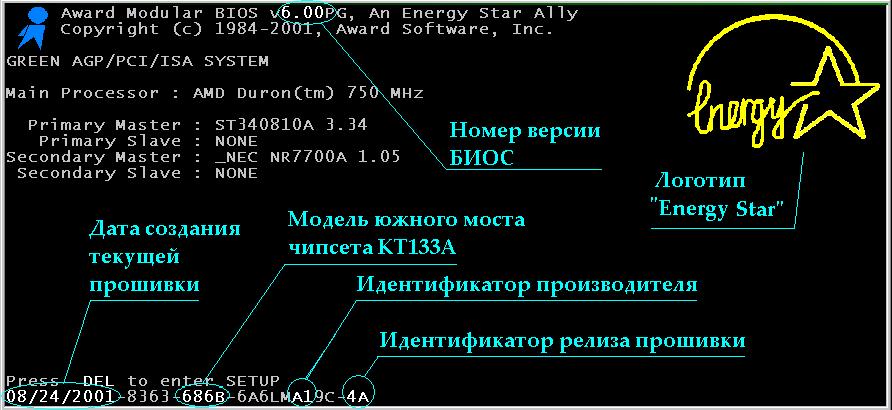
There are sites (like this) that explain how to approximately determine motherboard info from numbers at the bottom of BIOS splash screen. However, in my case there was no need for it, because motherboard model name (AX3S-U) was explicitly written within the BIOS splash screen. Googling for numbers from the bottom of BIOS splash screen confirmed that.

To honor @fixer1234: he said that existing question contained several answers without need for administrator privileges; while I can't confirm this (most of the answers from there either require admin rights, or show useless AOPEN_ AWRDACPI info that I already have), two suggestions (SIW and Intel SIU) really weren't tested by me, so theoretically he may be right.

Sasha
  • 98
  • 2
  • 16