Given a standard installation of Cygwin for Windows XP, I would like to create a standard Explorer shortcut that opens a bash shell already open on a directory of my choosing. The directory is a UNC path. The standard cygwin.bat doesn't work because it invokes cmd.exe, and cmd.exe does not like UNC paths. Ideally, it doesn't start cmd.exe or any other shell to open bash. I've tried manipulating .bashrc and dredging my memory from my Unix days, but sadly that's lacking these days. Various solutions I've tried are almost working, but not quite.
Asked
Active
Viewed 1.8k times


2 Answers
12
I haven't toyed with UNC paths, but in general you have to use forward slashes instead of backslashes I believe. For regular drives, you can use /cygdrive/c for example to access the C drive.
In a batch file, to open the shell to the root of C: you could use:
c:\cygwin\bin\bash.exe --login -i -c 'cd "/cygdrive/c";bash'
You may also be interested in chere a context menu entry for Open bash here:
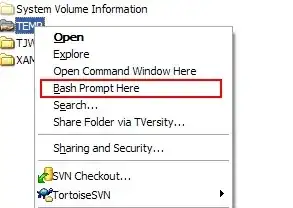


-
Another reason to use `chere` is that it allows you to choose what terminal you want to open, the default cygwin terminal is a bit clunky IMO. I have it to open an rxvt terminal instead. – Nifle Mar 03 '10 at 12:10
-
Thanks for your answer. I see where one of my attempts went wrong: no ;bash after the cd! Thanks also for the context menu entry... – Kit Mar 04 '10 at 17:47
-
A great tool when you want to write some script for someone but they don't want to open a shell prompt and cd to the working directory. – Calculus Knight Oct 18 '16 at 10:28
1
I added a subfolder in registry at HKEY_CLASSES_ROOT/Directory/shell, added key Cygwin with key command where the command's value is
cmd.exe /k "E:\PATHTOCYGWIN\bin\bash --login -i -c "cd ""%L"";bash""

Martin Prikryl
- 21,071
- 9
- 77
- 157

Bondax
- 111
- 4