9

I have a webos tv that support both Intel Wireless Display and miracast.

I want the tv screen to extend my desktop monitor like with xinerama : that is, I don’t want the tv to mirror the image of my desktop monitor (the main reason is the tv has a wider resolution as well as an higher possible refresh rate).

I found only MiracleCast, unfortunately, it only allows screen mirroring.

Update

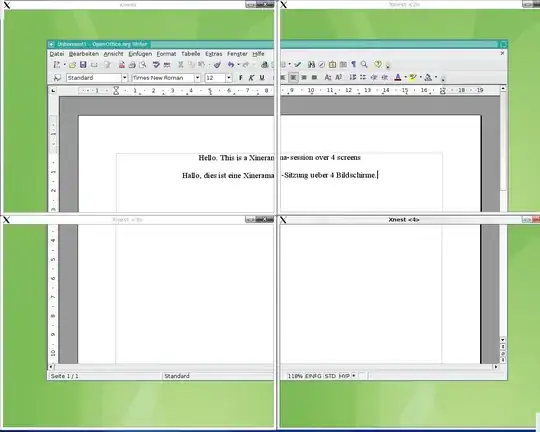
For those who don’t have an idea of what Xinerama is :
user2284570
  • 1,799
  • 7
  • 35
  • 62
  • I'm afraid you are out of luck in Debian. On Windows 8.1/10, Mac and Android this is easy. For Linux you might try to compile and use [aethercast](https://launchpad.net/aethercast) - good luck on that. A smart TV can receive video via DLNA or even stream the desktop, but this is not what you want. The only real solution I can see is to extend an HDMI cable from the computer to the TV. – harrymc Jan 13 '17 at 21:30
  • 1
    @harrymc : aethercast is a D‑bus api, not a program. I asked the question on superuser, not on stackoverflow. There’s no way to put the computer and the television on the same stair. A least do you think such question should receive upvotes ? – user2284570 Jan 14 '17 at 21:13
  • HDMI can be cabled over 10-15 meters without problem. With additional hardware much more can be achieved ([one link](http://www.cablestogo.com/category/hdmi/hdmi-extenders) among many) or over LAN ([possible example](http://www.networktechinc.com/ip-hdmi-lc.html#tab-1)) or even over powerline. I have no experience with this, so cannot recommend a product. If you like some such idea you will need to do the research yourself. – harrymc Jan 14 '17 at 22:35
  • @harrymc : I would say 20 or 30 meters *(it is for the same reason I can’t use ethernet for Internet access)*. But since hdmi over ip is possible, why not hdmi over 300mps wi‑fi ? I also can’t use powerline for data because it is already used by the electricity provider. Remember I’m not really ok to pay for something which would free on Windows beta. – user2284570 Jan 14 '17 at 22:47
  • Powerline already used by the electricity provider ? Powerline is only local to your house. In any case, wireless solutions do exist. – harrymc Jan 15 '17 at 08:11
  • @harrymc : no it is not local, they use it for collecting electricity consumption in real time *(x10 automation users have now fun in the country at getting their halogen lamps light itself at various hours like 3am)*. I didn’t saw any wireless solutions costing less than 100€. – user2284570 Jan 15 '17 at 14:26
  • In Amazon querying for "hdmi wireless transmitter and receiver" get a zillion answers. Example [Signstek PAT-630](https://www.amazon.com/Signstek-PAT-630-Wireless-Transmitter-Receiver/dp/B00E953OJQ/ref=sr_1_28?ie=UTF8&qid=1484492025&sr=8-28&keywords=hdmi+wireless+transmitter+and+receiver) $41.99. – harrymc Jan 15 '17 at 17:33
  • @harrymc : no currency conversion available in my case. Also, I find that sill expansive compared to the Miracast way. – user2284570 Jan 15 '17 at 17:35
  • Miracast is about casting = mirroring. You want much more. Only Windows 8.1/10 has it built-in. – harrymc Jan 15 '17 at 17:37
  • 1
    @harrymc : no, technically, it’s about sending a video signal over a peer to peer wif‑fi connection. – user2284570 Jan 15 '17 at 17:39
  • Technically casting is very different from extended desktop. Let us stop commenting, or some moderator may decide to delete all our comments. – harrymc Jan 15 '17 at 17:45
  • Last remark: You have enough information and several possible directions, all needing new hardware to be bought. You know best your budget and physical constraints, so you will need to do the research and decide. If you have good electronics shops in your area, choose one that allows returns, or use Amazon, so you could backtrack. Someone else on this forum might be able to give more specific advice, but that's as far as I can help. – harrymc Jan 15 '17 at 21:17

1 Answers1

0

To summarize my discussion with the poster :

While using TV as an extended desktop is easy for Windows 8.1/10, Mac and Android, it is not that easy on Linux.

Below are some directions you could follow :

  • Connect the TV to the computer via HDMI, using one of the numerous hardware solutions for HDMI extender cables (example), or HDMI over IP (example) or over Wireless. These solutions can extend reception up to more than a hundred meters.
  • Connect your tablet as secondary monitor and cast it to the TV. Numerous sources exist for this and here is one random link.

These all require new hardware to be bought. As you know best your budget and physical constraints, you will need to do the required research and decide. If you have good electronics shops in your area, choose one that allows returns, or use Amazon, so you could backtrack.

harrymc
  • 455,459
  • 31
  • 526
  • 924