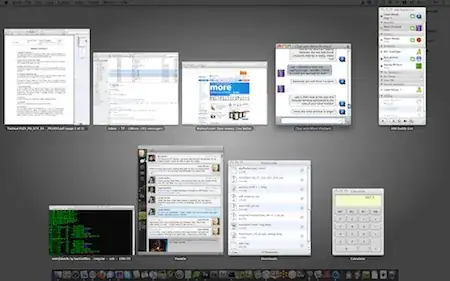
8

I'm amazed this question hasn't been asked here. There are many discussions about it out there and even a way to remove the blue glow. Of course I've already filed my complaint with apple...

Is there a way to have the old expose on Snow Leopard? Or maybe a mix of both.

The only thing I like on the new one is viewing minimized windows, but not always.

I'd prefer just being able to tweak it a little bit, but having the old expose would be fine as well.

Bad Expose

bad expose

Gaff
  • 18,569
  • 15
  • 57
  • 68
cregox
  • 5,804
  • 7
  • 49
  • 66
  • Not sure why you were downvoted, but I'm going to guess that the answer is no on this this one. – fideli Mar 12 '10 at 06:38
  • @fideli yeah me too. But I'm hoping for a **no** with a good explanation. ;) As for the downvote, I just said elsewhere - mutant powers! :D – cregox Mar 12 '10 at 13:18
  • As for your "I still hope for a better answer" at the accepted answer: I think many here might skip reading your question, seeing it has an accepted answer and hence assuming your problem is solved? (Especially given your own "I never read through every forum topic I find with much more than 2 pages", which for others might read "I never read through questions that have an accepted answer"...) – Arjan Mar 14 '10 at 18:45
  • @Arjan I never read through answers questions with too many answers as well. It's got nothing to do with being accepted or not. I accepted it, because I used it and I enjoy it, and it did answer my question. It's just not optimal. And reading is boring. Though most people here might disagree, I don't think anyone really enjoy reading as a human nature. If there is anyone who actually prefer reading a book rather than talking to the author that is the exception which confirms the rule. But thanks for the heads up and all the help around! ;) – cregox Mar 15 '10 at 15:40
  • 1
    awesome hack! thanks really a lot !!! I hope we will be able to so something similar in Lion – Open the way Mar 26 '11 at 16:37
  • @user yeah, I hope for that too! – cregox Mar 26 '11 at 20:09
  • I wish you the best of luck with Lion's Mission Control. It sounds like it might introduce some incompatibilities here to mess up your workaround. – Daniel Beck Mar 26 '11 at 20:15
  • @Daniel so, you love the old expose as well? :P – cregox Mar 26 '11 at 20:21
  • Just stumbled over your edit while looking through the `osx` tags, and that got me thinking about Lion. I've come to live with everything but minimized windows of hidden applications (that's just stupid). My days of reporting bugs to Apple are mostly over (and I also filed a few for original Exposé ;-) ) – Daniel Beck Mar 26 '11 at 20:24
  • @Daniel you know, on the 27'' iMac I'm using at work, I agree with you. I haven't even installed original expose there as, indeed, the only thing really annoying on the expose is the minimized windows not getting hidden along with the application. But here at my 13'' macbook the "organized" layout of messing up the windows sizes still makes expose utterly useless. And only reason I haven't insisted in using original expose at work is because I don't have a root password. – cregox Mar 26 '11 at 20:30
  • Never had fewer than 15" on a Mac, and am not an Exposé heavy user anyway, so that was never an issue for me. At least they fixed the layout bug when you only have multiple identically sized windows open (e.g. full height Safari windows) -- original Exposé aligned them all in a single row, new Exposé will split into multiple rows starting with 6 windows. That behavior drove me insane back then. – Daniel Beck Mar 26 '11 at 20:34
  • @Daniel when you say "original expose" there, you mean original SL expose, right? yeah, that's another annoyance on the freaking 10.6 expose. – cregox Mar 26 '11 at 20:38
  • 1
    Nope, 10.4 Exposé, filed in december 2005 as #4394897. Don't know how 10.5 Exposé behaved, but 10.6 (new Exposé) distributes windows over multiple rows, starting with 3x2 at 6 windows. From my bug: "Expected Results: I expected to see the windows [distributed] all over my screen (9 windows in 3x3 arrangement, for example) [...]. Actual Results: All windows in one single row (9 windows in 9x1 arrangement). [Notes:] It seems all windows must be full [height] and belong to the same application." – Daniel Beck Mar 26 '11 at 20:43
  • @Daniel I can see a similar behavior on 10.6 expose, but I don't think it lines up as much as 9 windows in 1 line. Up to 4 it sure does, and it looks terrible on a 13'' screen. – cregox Mar 26 '11 at 20:49
  • As I said, it doesn't go on more than 5 windows. Still not *that* good, but imagine that with 9 or more windows as I described there. – Daniel Beck Mar 26 '11 at 20:50
  • 1
    @Daniel anyway, seems like **10.5 expose** would be a more ideal name for this hack. – cregox Mar 26 '11 at 21:01

3 Answers3

7

Solution

Download OriginalExpose and run Install Script.app. That's it.

Background

Ok, summing up, I did my own version of the very good result (the DockHack) out of a macrumors topic, by psid, and I want to share with you guys directly here, as this is a very proper and simple solution.

The only problem is we still need to download the files, which are extracted from a Dock.app remainescent from Snow Leopard beta, that still used the Original Expose from Leopard (and before).

Since there's a file to download anyway, I've added a Install Script to it, which will apply something similar to the following commands below (except it won't move itself anywhere). You can optionally replace "SL-bak" to anything you want to backup your "Snow Leopard" dock to:

mv ~/Download/OriginalExpose ~/
sudo cp -R /System/Library/CoreServices/Dock.app /System/Library/CoreServices/Dock.app.SL-bak
sudo cp ~/OriginalExpose/Contents/MacOS/* /System/Library/CoreServices/Dock.app/Contents/MacOS/
sudo cp ~/OriginalExpose/Contents/Resources/* /System/Library/CoreServices/Dock.app/Contents/Resources/
killall Dock

update: Looks like Lion will have a better expose and I hope this whole post becomes useless after it. But, meanwhile, this still works perfectly fine even with 10.6.8! :)

Good Expose

I can't imagine how this would look on the bad one:
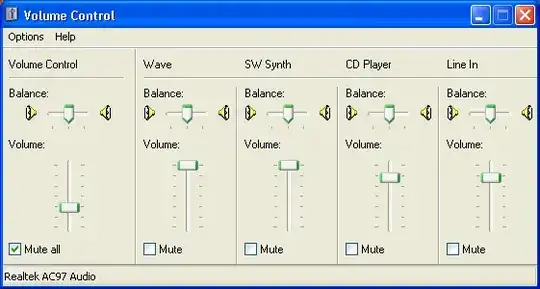
good expose

Gaff
  • 18,569
  • 15
  • 57
  • 68
cregox
  • 5,804
  • 7
  • 49
  • 66
  • hi, I did this and I really like it. the thing is (and please tell me if you experienced this or not) is that sometimes screen is kind of out of resolution or blurry or not focused, even after selecting a window in exposé, is it normal? another thing; sometimes CPU hogs up to 150% cpu, did you experience this side effect ? – Open the way May 21 '11 at 07:46
  • 1
    @user10826 nope, nada. I've been running this for about 1 year now, and re-applying it after every snow leopard's update since then, and never had any such weird issues. Also CPU stays unaffected and if you mean each window can become unreadable with fuzzy fonts while on the expose view, that is normal. But graphics and video are quite viewable without losing that much quality. – cregox May 21 '11 at 12:22
  • 1
    hi, does this trick work in OSX Lion? – Open the way Aug 30 '11 at 08:06
  • @flow I just installed Lion yesterday and I the trick both doesn't work and I'm glad to say I don't care about it anymore. Mission Control is good enough and has a lot of advantages! I believe at very least most 10.5 expose users will be as pleased with Lion's MC as I am. – cregox Oct 26 '11 at 00:32
  • yes, i agree, mission control is much better (for me) than leopard's exposé and of course snow leopard's one – Open the way Oct 26 '11 at 07:44
1

We cannot use this hack with Montain Lion 10.8, but Apple provides standard OldExpose feature.

http://takahar.blogspot.jp/2013/05/oldexpose-on-mountain-lion-108-within.html

takahar
  • 21
  • 1
  • Kindly elucidate. – Roney Michael May 02 '13 at 08:50
  • 1
    +1 anyway. It's a good point but I think this would go better as a comment unless you want to replicate your post as an answer (not that big blog post anyway). But then it would better fit another question or a new one. The question here was always intended to be with **Snow Leopard** and the current answer even already has a comment about how I don't care about *Old Expose* since *Mission Control*. The only thing I would add is that **Lion 10.7 does not provide the feature on the System Settings** nor can we use the hack (also have been already commented). – cregox May 02 '13 at 11:11
  • As a final note, you've got a couple of easy-to-fix typos @takahar: "montain" and "OldExplse". – cregox May 02 '13 at 11:14
0

There is a solution indeed to it posted in your second link. You really should have read it completely.

Edit:

Ok, to be fair, I did not read it fully either. But the first place to look for an answer is the last page and the answer is written there. (Or at least there are some more links describing a way to get it back.) It’s a little bit of a hack which needs the installation of a previous beta version of Dock.app, therefore I did not want to give a direct link to it and rather enforce that you read about the consequences and the current status before trying it yourself.

One of the problems with this solution is, that it also removes the advantages of the Snow Leopard Exposé. That is, it’s not possible anymore to activate it by pressing the icons in Dock. Also, the nice black transparent menus are removed.

And it’s currently English only.

Debilski
  • 1,296
  • 10
  • 13
  • There are 9 pages with a LOT of text... I **never** read through every forum topic I find with much more than 2 pages, and I'd bet neither do you. I'm (right now) reading this one, since you said so. But why didn't you just tell me if **you** actually read it too, or used some way to search that I'm not familiar with? And why not pointing to the specific post you've found to be useful and quote it here? – cregox Mar 14 '10 at 17:04
  • 1
    Here: http://forums.macrumors.com/showpost.php?p=9333516&postcount=211 That also changes the Dock behavior, but well, it's not a bad solution at all! I still hope for a better answer, tho. – cregox Mar 14 '10 at 17:36
  • Please see *Are answers that just contain links elsewhere really “good answers”?* at http://meta.stackexchange.com/questions/8231/are-answers-that-just-contain-links-elsewhere-really-good-answers Thanks! – Arjan Mar 14 '10 at 18:16
  • You didn't really need to tell anyone that you never read anything before posting. – Hasaan Chop Mar 14 '10 at 18:41
  • Debilski, that's what I meant - it does remove the good points of SL Dock and Expose, which are minor comparing to how it looks. But I still can activate it from the Dock, just put Expose.app there. And it's so nice to have the old expose back anyway! – cregox Mar 15 '10 at 15:43
  • Yeah, that would be a workaround, but I have an active corner for that anyway. However, what’s not possible to work around, is to have Exposé activated for a window group other than the current one. I liked that in SL. – Debilski Mar 15 '10 at 21:48
  • I was using SL expose for some time and I must admit I didn't like somethings on the old expose as well, that I've missed from the new one. But the main point here, the ability to keep windows in ratio sized instead of resized all to same aspects, is the killer point, so I still choose old Leopard one. In general, it is much better for organization, and the "upgrade" is a failure as me and many more can list on. – cregox Apr 11 '10 at 23:35