18

I'm trying to make a single terminal window appear on every space but the built in spaces only allow to configure this per application basis. This makes it more or less useless for terminals if you have multiple terminal windows on multiple spaces.

DesktopManager seams to have solved this for older versions of Mac OS X.

Daniel Beck
  • 109,300
  • 14
  • 287
  • 334
Mattias Wadman
  • 283
  • 1
  • 2
  • 7

2 Answers2

32

Not obvious but built into MacOS.

Right click on the application icon in the dock -> options -> All Desktops

cayossarsian
  • 429
  • 1
  • 4
  • 2
11

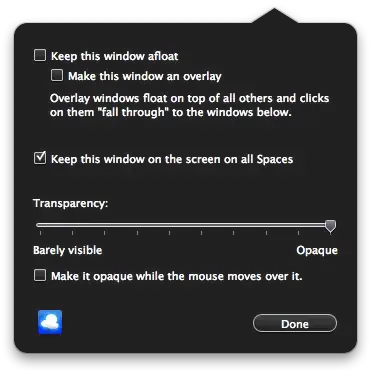
The 3rd party software Afloat can do this. See the installation instructions:.

  1. Download the SIMBL zip file
  2. Unzip the file
  3. Double-click/install SIMBL-0.9.9.pkg
  4. Create SIMBL bundle dir: mkdir ~/Library/Application\ Support/SIMBL/Plugins/
  5. Reboot
  6. Install from the git repo:
$ git clone https://github.com/millenomi/afloat.git
$ cd afloat
$ xcodebuild -configuration Release install
  # verbose output trimmed, except for last line:
  ** INSTALL SUCCEEDED **
$ mv /tmp/Afloat.dst/Users/`whoami`/Library/Bundles/Afloat.bundle/ ~/Library/Application\ Support/SIMBL/Plugins/

Screen Capture

Denialos
  • 182
  • 9
Josh
  • 9,487
  • 11
  • 49
  • 70
  • Works for me for the most part. The only bad thing is the lack of updates on that repo. The author has not been active for some time. – Chris Jul 06 '15 at 19:53
  • Can anyone confirm if this is still working on macOS Ventura M1? – PrinceKickster Jan 22 '23 at 13:29
  • I haven’t used Afloat in over 8 years. I would be surprised if this is still a correct or relevant answer… – Josh Jan 22 '23 at 20:03