4

My Windows 8.1 laptop has not been updated for a long time. I am trying to run Windows Update > Check for updates but it keeps showing the Checking for updates... progress bar forever (more than 3 hours):
Checking for updates...

I tried all two approaches described in the YouTube video entitled "How To Fix Windows Stuck On Checking For Updates FIX 2017!" but none works. Namely:

  1. Stop 2 services and delete all contents of the SoftwareDistribution folder.
  2. Downloading from Microsoft and running the Windows Update Troubleshooter.

I also disabled the firewall, as suggested here:

https://answers.microsoft.com/en-us/windows/forum/windows_other-windows_install/fix-windows-updates-fail-to-install-in-windows-7-8/260f8566-8d0f-4535-817a-be01c6a9d0f7

But none worked for me. Is there any other trick that I can use to revive* my laptop's Windows 8.1 update?

*I'm saying revive because it used to work perfectly. I don't know when it stopped.


UPDATE:

@magicandre1981's 1st tip in his answer did the trick:
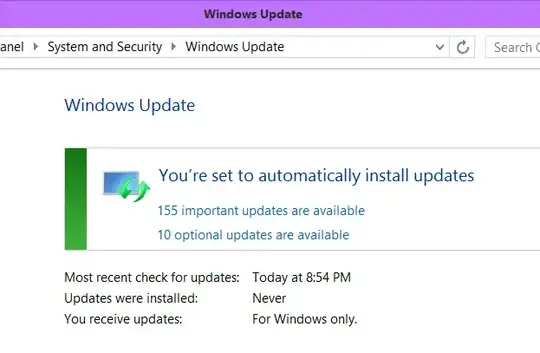
Windows Update works!

(the reason it says "Never" for "Updates were installed" is because during all my attempts to revive update, I have reset and clear the entire SoftwareDistribution folder)

magicandre1981
  • 97,301
  • 30
  • 179
  • 245
Jay Souper
  • 143
  • 1
  • 1
  • 5
  • How long have you actually waited, as it's impossible to wait forever? – djsmiley2kStaysInside Mar 17 '17 at 11:15
  • @djsmiley2k About 3 hours. – Jay Souper Mar 17 '17 at 11:17
  • https://superuser.com/questions/922261/windows-8-1-stuck-on-checking-for-updates and https://superuser.com/questions/1120602/cannot-install-any-updates-on-clean-windows-8-1 and https://superuser.com/questions/1103966/windows-update-doesnt-work-on-window-8-1 and https://superuser.com/questions/1396051/windows-update-problems-after-fresh-windows-8-1-install and https://answers.microsoft.com/en-us/windows/forum/windows8_1-update/windows-8-update-searches-forever-solved/71976680-ccc5-4bd6-bfe5-f2f46ae7c734 – caw May 02 '19 at 06:48
  • Possible duplicate of [Windows 8.1 stuck on "Checking for updates..."](https://superuser.com/questions/922261/windows-8-1-stuck-on-checking-for-updates) – stiemannkj1 May 02 '19 at 16:02

1 Answers1

5

Stop the Windows Update Service (via services.msc or in a cmd.exe which is started as admin via net stop wuauserv - this improves speed of installing the MSU update which you have to download), download and install this update by double click on the MSU:

Installing and searching for updates is slow and high CPU usage occurs in Windows 8.1

Do a reboot and check again for new updates. Now Windows Update should work and show new updates in a few minutes. If not, stop Windows Update again and try the March 2016 Windows Update Client.

magicandre1981
  • 97,301
  • 30
  • 179
  • 245
  • OMG You are an angel. Your [1st tip](https://support.microsoft.com/en-us/kb/3102812) did the trick. Thank you so much! – Jay Souper Mar 18 '17 at 19:12
  • I was sure hoping this would work, but running either of the indicated downloads behaves a lot like Windows Update itself, in that it puts up a window saying "Searching for updates on this computer" and then sits there forever with the scrolling progress bar. And not even the Cancel button works. – vanmelle Apr 12 '19 at 00:36
  • @vanmelle as I said, before clicking on the MSU , stop the WU service otherwise you get the hang. – magicandre1981 Apr 12 '19 at 13:29
  • Oh, I made sure to stop the service. It didn't help. I eventually succeeded with the help in [this other post](https://superuser.com/a/1409639/1020518) – vanmelle Apr 15 '19 at 06:49