49

How can I change a font name (not the ttf filename, but the actual font name)?

For example, I want to rename "Tahoma" to "Tahoma7".

My goal is to rename the Tahoma font installed on Windows 7 and install it on Windows XP under different name, so I will have both Tahoma fonts installed on a single operating system. The two fonts are slightly different, and I'd like to have them both.

blizzrdof77
  • 123
  • 7
RubyWedge
  • 621
  • 2
  • 7
  • 11

6 Answers6

30

FontForge may be of use:

FontForge -- An outline font editor that lets you create your own postscript, truetype, opentype, cid-keyed, multi-master, cff, svg and bitmap (bdf, FON, NFNT) fonts, or edit existing ones. Also lets you convert one format to another. FontForge has support for many macintosh font formats.

Shevek
  • 16,502
  • 7
  • 46
  • 75
  • Thanks. It helps. I have used other free font editor Type 2.2, but it doesn't matter. – RubyWedge Mar 16 '10 at 16:02
  • Using Win7 SP1 it keeps crashing on me. It also couldn't navigate to a different drive other than C: and didn't have an intuitive save as type setup. – VoteCoffee Sep 23 '14 at 18:28
  • 3
    @VoteCoffee You can type : in the open dialog and press enter, this opens up the open dialog of a different drive. (Not too intuitive, I just found it accidentally and it seemed useful to share) – Csq Nov 04 '14 at 10:03
  • 2
    Free / Open Source! – Jess Feb 25 '16 at 14:31
14

TTX is a command line tool and can be make it pretty simple to change a font's name. There's a tutorial on how to do exactly that here: http://www.fontgeek.net/blog/?p=343

Download TTX as part of fonttools

Stickley
  • 105
  • 3
davidcondrey
  • 1,628
  • 1
  • 22
  • 27
5

You can use Typograf for that.

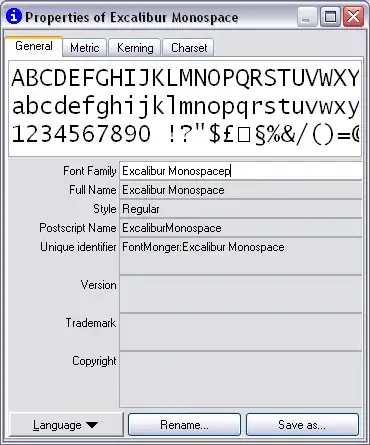
Navigate to the folder where font is located, select .ttf file, click Properties. Properties window will appear:

enter image description here

Change font names (font family, full name, Postscript name etc) as required and click "Save as..." button.

Gaff
  • 18,569
  • 15
  • 57
  • 68
Pavel Chuchuva
  • 11,769
  • 5
  • 22
  • 24
  • works nicely - and quick install – Simon Apr 06 '11 at 06:44
  • 11
    Horrible, terrible UI, and the buttons move to try and trick you into buying it – jjxtra Aug 31 '12 at 22:19
  • 13
    -1 This shareware isn't worth the money – mate64 Jan 29 '13 at 12:38
  • 1
    The close dialog box is too much annoying – Anwar Feb 27 '16 at 12:06
  • Who cares about the UI when this gets the job done (and it got updated in the meantime). Out of all suggested solutions, THIS did the job. Even when it's shareware, it let me do it without having to pay. It edited the meta data only, without modifying the font itself. FontForge and others tampered with the font data, which lead to serious problems. Look at this answer for additional information why this is important to be aware of: https://stackoverflow.com/a/70876695/4348149 – Testerhood Feb 12 '22 at 20:27
  • 1
    The version I just downloaded no longer seems to have the ability to click on the above fields to edit them. – Matija Erceg Oct 20 '22 at 05:01
2

Per this answer on StackOverflow:

  • Import your font file in the online Glyphrstudio font editor
  • Click the hamburger icon on the top left
  • Select font setting and change title and meta data from there
Steven Pease
  • 141
  • 1
  • 7
  • Please do not post the same answer to multiple questions. If the same information really answers both questions, then one question (usually the newer one) should be closed as a duplicate of the other. You can indicate this by [voting to close it as a duplicate](https://superuser.com/help/privileges/close-questions) or, if you don't have enough reputation for that, [raise a flag](https://superuser.com/help/privileges/flag-posts) to indicate that it's a duplicate. Otherwise tailor your answer to this question and don't just paste the same answer in multiple places. – DavidPostill Aug 11 '22 at 06:29
-2

It does not appear you can do this. I opened the tahoma.ttf file in a hex editor and the version information (including the font family name) is encrypted with something from VeriSign, Inc., specifically VeriSign Time Stamping Services CA. I see the files are different versions, but I can't visually see any difference.

Beaner
  • 3,621
  • 1
  • 20
  • 16
-2

Microsoft Windows's Font properties editor is free and available at www.microsoft.com (no DKIM).

It will do the job.

mate64
  • 177
  • 1
  • 11
  • 1
    I couldn't change this font's name: https://github.com/Lokaltog/powerline-fonts/blob/master/UbuntuMono/Ubuntu%20Mono%20derivative%20Powerline.ttf – rofrol Oct 10 '13 at 19:20
  • 3
    Wow, that page https://www.microsoft.com/typography/property/fpedit.htm not edited since 2003 - felt like going back in time :S – Ruskin Jun 25 '15 at 11:21
  • Back in time is before 1994 (Netscape?) or 1980, or Jan 1, 1900 – Mark Stewart Apr 30 '19 at 19:05
  • It redirects to a modern site now, what a shame, I wanted to see it – onetdev Jun 22 '22 at 05:42