24

There are times after I eject a USB Flash drive, I want to copy some more files over to the USB Flash drive. In this case, do I always need to unplug the drive and plug it back in? Is there a way to "reconnect" or "un-eject" the drive?

To eject, that are two ways:

  1. Right click the drive (say H:) and choose Eject
  2. Click "Safely remove hardware" from the icon tool

But there seems to be no way to un-eject or reconnect a drive.

quack quixote
  • 42,186
  • 14
  • 105
  • 129
nonopolarity
  • 9,516
  • 25
  • 116
  • 172
  • you're obviously using windows, but this is the same question for OSX: http://superuser.com/questions/110856/how-can-i-remount-an-ejected-not-just-unmounted-usb-drive-on-mac .. related questions on Stack Overflow: http://stackoverflow.com/questions/916296/how-can-i-cycle-a-usb-device-from-c/919836#919836 http://stackoverflow.com/questions/138394/how-to-programatically-unplug-replug-an-arbitrary-usb-device – quack quixote Mar 20 '10 at 14:16
  • 1
    It's a lot faster to just remove and reinsert the USB plug, rather than clicking twenty times in Windows dialogs. MHO. – Torben Gundtofte-Bruun Sep 06 '10 at 12:38
  • 1
    @torbengb: sometimes, it's an internal USB connection that you can't easily replug, so this is faster than rebooting the machine. – erjiang Dec 31 '10 at 02:21
  • 1
    @TorbenGundtofte-Bruun - Sometimes the computer with the USB drive is in a server room in a building very far away. – Kenny Aug 03 '12 at 13:57
  • @Kenny: I get it y'all :-) quit bashing me for something I said two years ago. – Torben Gundtofte-Bruun Aug 03 '12 at 14:11
  • Or it’s a flash-drive plugged into the back of the computer under the desk. Physical access isn’t always easy/possible. One *could* reboot to have it remounted, but that’s much more annoying than clicking twenty times. That should last for another two years. `:-P` – Synetech Oct 08 '12 at 04:36
  • Related: [How do I get Windows Vista or Windows 7 to re-attach a USB device without having to plug it in again?](http://superuser.com/questions/32023/how-do-i-get-windows-vista-or-windows-7-to-re-attach-a-usb-device-without-having) – Ƭᴇcʜιᴇ007 Mar 19 '14 at 20:15

2 Answers2

17

You need to remount the drive. Depending on the operating system there are several ways to do this.

Assuming Windows:

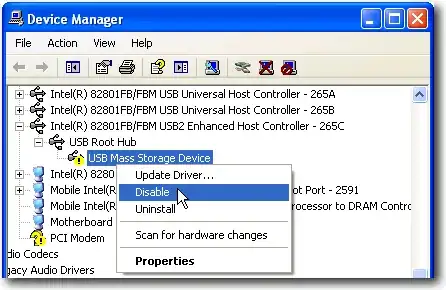
  1. Right click My Computer and select Properties (or you can simultaneously press Win+Pause/Break key). In System Properties window, go to the Hardware tab and then click the Device Manager button. In Windows Vista or Windows 7, you can just click the Device Manager link located at the left hand sidebar when you are at the System Properties window.

  2. Click View from the menu bar and select “Devices by Connection“.

  3. Find the parent USB Root Hub of the USB device that has a yellow color exclamation mark. Right click on the USB Root Hub and select Disable. Again right click on the same USB Root Hub that you’ve just disabled and this time select Enable.

    Window

From Remount Ejected or Safely Removed Drive.

A little Google-Fo will yield results for OS X and various Linux distro's.

Gaff
  • 18,569
  • 15
  • 57
  • 68
Josh K
  • 12,747
  • 7
  • 41
  • 58
  • 4
    note that disabling & re-enabling the Root Hub will reset *all devices on that hub* -- it will work, but that could be a nasty side effect under some circumstances. **if there are other USB drives on that hub, you should eject/unmount them all before performing this procedure.** – quack quixote Mar 20 '10 at 14:18
  • 4
    Why is a restart required before this will work? : http://screenshoot.me/JuItNj – Pacerier Oct 05 '11 at 07:23
  • 2
    I too get the same dialog box as @Pacerier. – HNL Dec 22 '11 at 08:58
  • @HNL exactly, that sorta defeats the purpose – Pacerier Dec 23 '11 at 16:43
  • @Pacerier: Maybe you get the restart required message because you're using Win XP and Josh K isn't. – martineau Sep 20 '12 at 17:40
0

A reboot is required with Windows 7, simply logging off and back on isn't sufficient. Given than, what not save time and just reboot without the above procedure?

Richard
  • 21