1

So, after around 5 minutes of idle, CPU goes to ~12% usage by process SYSTEM (PID 4), more specifically by thread called ntoskrnl.exe!ExQueueWorkItem+0x400 and after some time it ends by itself but it happens everytime I left my PC idle. If any key is pressed or the mouse moved, this stops immediately.

I have this PC for a year already and never seen this before last couple of months. So, i did clean installation of windows about two weeks ago to solve this and there was not such a problem since then but today it appeared again. I didn't make any changes in software/hardware.

I have all drivers updated, Windows 10 Home, Fall Creators Update with latest build. Despite this everything is working fine but this problem is annoying.

So what should I do?

Edit: i found out using taskschedulerview that everytime this cpu usage happen there are several processes every time the same
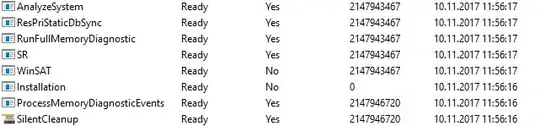
screenshot from taskschedulerview

magicandre1981
  • 97,301
  • 30
  • 179
  • 245
Ravasaur
  • 19
  • 1
  • 3
  • Usually, unusual activity by the kernel is due to a buggy driver. Especially if it's recent, I would investigate rolling back some drivers to older versions if possible. – Bob Nov 10 '17 at 05:30
  • disable **RunFullMemoryDiagnostics** this task is launched during idle to test RAM for errors. – magicandre1981 Nov 10 '17 at 16:00
  • Thank you so much @magicandre1981! Disabled this thing and cpu usage is now normal while idle – Ravasaur Nov 16 '17 at 11:44
  • in the ETL file you should see **ntoskrnl.exe!RtlpGenericRandomPatternWorker, ntoskrnl.exe!RtlpTestMemoryRandomUp** calls. I posted this case in the large SYSTEM topic. – magicandre1981 Nov 16 '17 at 16:04
  • @magicandre1981, i didn't do ETL file actually because disabling RunFullMemoryDiagnostics seems to have helped (didn't see any cpu usage like this since then), however in Process Explorer it was thread called ntoskrnl.exe!ExQueueWorkItem. Do not know if it says something. – Ravasaur Nov 17 '17 at 12:19
  • you see this in callstack. ProcExp only shows the snapshot and leads to wrong diagnostics. – magicandre1981 Nov 17 '17 at 15:33

0 Answers0