6

In Firefox version 59.0.2 on a Core i7 6xxx series with the latest nVidia graphics card drivers, when on battery power only, my two-finger touchpad scrolling experience in Firefox is terrible. When I scroll with two fingers and hold (i.e. not flick), scrolling by half a screen up or down, the scroll starts right away, but takes several seconds to get there. Here's an example. In this GIF, I gestured fast and cleanly, in a split second, but it took several seconds to be done scrolling. The two-finger gesture was in one motion, but the scrolling window seemed to scroll slow and medium speed and then slow again.
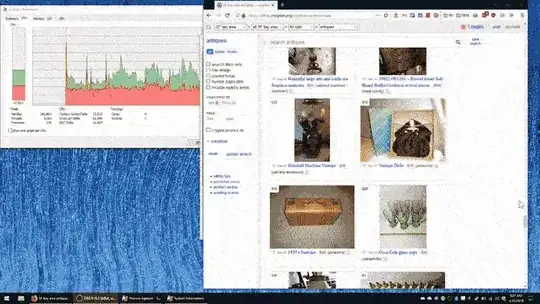
The problem isn't so much lag per se--it starts scrolling immediately; nor is it starving for CPU or resources. It seems instead that there is something programmatic keeping it from scrolling faster or "with more FPS".

Other Windows apps seem to scroll with the gesture just fine.

How can I fix Firefox's slow-responding two-finger touchpad scroll when not plugged into AC power?

An internet search reveals a ton of dart-throwing ideas to fix similar (but not exact issues) I tried turning off smooth scrolling and pixel scrolling in about:config; that didn't help. I'm sure that the CPU behavior is different under battery power, but I don't see a setting "make touchpad scroll slow in Firefox" in Windows Power Options. Any ideas?

galacticninja
  • 6,188
  • 16
  • 78
  • 120
Patrick Szalapski
  • 241
  • 1
  • 7
  • 21
  • is Firefox using HW acceleration or not? Check this in **about:support** – magicandre1981 Mar 31 '18 at 14:25
  • I see lots of info in about:support. What setting am I looking for? – Patrick Szalapski Mar 31 '18 at 15:06
  • do the opposite of this: https://winaero.com/blog/disable-hardware-acceleration-firefox-quantum/ in the suport window you should also see if it works. I use german firefox so the names are different. – magicandre1981 Apr 01 '18 at 18:39
  • OK, I've tried that--hardware acceleration is on, no longer "using recommended performance settings". No change-still get jumpy and slow scrolling with touchpad only. The scroll wheel on my mouse works well, as does touchpad scroll when on plugged-in power. – Patrick Szalapski Apr 09 '18 at 02:27
  • 3
    Try: (1) In Advanced settings for your power plan adjust "Minimum CPU power" on battery higher. Start with bumping it from 5% to 50% and then reduce if it helps. Might need reboot. (2) In about:config change `mousewheel.min_line_scroll_amount` higher. Start with bumping it from 5 to 50. Might need to restart Firefox. (3) What make is your touchpad and are you using the latest driver from the manufacturer? – harrymc Apr 09 '18 at 06:26
  • [install the WPT (first part of the answer)](https://superuser.com/a/1203562/174557), also run WPRUI.exe, select CPU, Power and GPU, click on start and now do the scrolling in firefox. after you did this, go back to WPRUI.exe, click on **Save**. Analyze it for CPU usage like I wrote in the linked topic. Also add the firefox symbol server to see the function names for firefox.exe: https://developer.mozilla.org/en-US/docs/Mozilla/Using_the_Mozilla_symbol_server if you can't follow it, zip the ETL (to reduce the size) and upload the zip (Onedrive, dropbox) and post a share link here. – magicandre1981 Apr 09 '18 at 15:15
  • magicandre1981: Should I do this even though I do not see any CPU spike (per the graph in the animation above)? – Patrick Szalapski Apr 09 '18 at 15:46
  • Check for touchpad drivers on the manufacturer support website for that device. – HackSlash Apr 10 '18 at 16:29
  • Any answers to my comment above ? – harrymc Apr 10 '18 at 17:10
  • @harrymc, I tried (1) and (2), no change. It seems that mousewheel.min_line_scroll_amount setting affects only the actual mousewheel scroll, not by touchpad. The driver reports as "Synaptics SMBus Touchpad" driver version 19.3.4.31 from 8/18/2016. This is a Sager NP8152 (Clevo P650RP6-G) notebook; this is the latest driver listed on sagernotebook.com and newer than the one on clevo.com. – Patrick Szalapski Apr 10 '18 at 23:23
  • 1
    Try the [Firefox Safe Mode](https://support.mozilla.org/en-US/kb/troubleshoot-firefox-issues-using-safe-mode) to see if the cause is an add-on. – harrymc Apr 11 '18 at 06:46
  • from the picture I still see a lot of cpu usage, so do it. here I can see what happens on your system – magicandre1981 Apr 11 '18 at 15:14
  • The scrolling issue is gone in Firefox Safe Mode! I went back to regular mode and disabled all add-ons, and the problem is still present. Then I *disabled* hardware acceleration (contrary to earlier ideas to enable it) and the problem went away! What in the world... Feel free to make an actual answer out of this, harrymc. – Patrick Szalapski Apr 12 '18 at 02:56
  • Done as requested. – harrymc Apr 12 '18 at 07:05
  • if you have such issues with HW acceleration, update the GPU drivers. – magicandre1981 Apr 12 '18 at 15:15
  • Already on they latest, as I mentioned. – Patrick Szalapski Apr 12 '18 at 17:34
  • you said only nvidia driver. In laptop the Intel HD of the CPU is used normally and the nvidia only for heavy 3D activity. so update the Intel GPU driver: https://downloadcenter.intel.com/download/27650/Graphics-Intel-Graphics-Driver-for-Windows-15-65- – magicandre1981 Apr 13 '18 at 15:01
  • I don't have an Intel GPU. – Patrick Szalapski Apr 13 '18 at 16:11
  • so you have a laptop without switching between Intel HD and nvidia GPU? next time post more details. the question is poorly written and lack details and normally had to be closed as too broad. – magicandre1981 Apr 14 '18 at 06:45

1 Answers1

2

If the problem is only present in Firefox, then the first check is to try the Firefox Safe Mode, where all add-ons are disabled, as well as some other settings.

If the problem disappears in Safe Mode, the next step is to return to normal mode and disable the add-ons in bunches until a problematic add-on is isolated.

If that does not help, even when all the add-ons are disabled, then the problem is with some setting.

For the poster, the problematic setting was Hardware Acceleration, and the problem disappeared once it was disabled.

See the article Hardware acceleration and WindowBlinds causes Firefox to crash for instructions on disabling hardware acceleration.

harrymc
  • 455,459
  • 31
  • 526
  • 924