In emacs, sometimes I will be in the middle of finding a file or switching buffers or doing something in the minibuffer, and I will click somewhere else for some reason. When I go back, the only way to make the minibuffer prompt active again is to click inside the minibuffer, which is annoying because it is a thin area. Is there any way to switch back to an active minibuffer prompt without using the mouse?
Asked
Active
Viewed 9,328 times


4 Answers
26
This will do what you want. Bind to the key of your choice:
(defun switch-to-minibuffer-window ()
  "switch to minibuffer window (if active)"
  (interactive)
  (when (active-minibuffer-window)
    (select-frame-set-input-focus (window-frame (active-minibuffer-window)))
    (select-window (active-minibuffer-window))))
(global-set-key (kbd "<f7>") 'switch-to-minibuffer-window)

Trey Jackson
- 3,951
- 23
- 25
-
2If you have multiple frames then you need to add `(select-frame-set-input-focus (window-frame (active-minibuffer-window)))` before the `select-window`. – dshepherd Jun 18 '15 at 08:28
-
@dshepherd I can confirm that after inserting your Elisp line, the enriched function is working well with only one frame as well. Thanks. – dimitarvp Dec 07 '15 at 15:11
-
@dshepherd Thanks, have updated code appropriately. – Trey Jackson Dec 07 '15 at 20:38
25
C-x o
Repeat as necessary.
C-x o runs the command other-window, which is an interactive built-in function in `C source code'.
If you do not want to cycle through windows, you can add a function in your init file and bind it to a key. Something like this might work:
(defun select-minibuffer ()
 "Make the active minibuffer the selected window."
 (interactive)
 (when (active-minibuffer-window)
   (select-window (active-minibuffer-window))))

Richard Hoskins
- 12,245
- 10
- 49
- 52
-
1Why would you want to include `RET` like that? It would automatically accept whatever was in the minibuffer (assuming a single `C-x o` switched to the minibuffer). Generally, one may need to use `C-x o` multiple times if there are (in Emacs parlance) multiple windows open in the frame (in normal GUI terms: multiple panes in the window). – Chris Johnsen Apr 18 '10 at 19:39
-
-
Is there any way to get directly to the minibuffer without potentially cycling through all windows? Should I just write a loop that does `other-window` until current window is minibuffer? – Ryan C. Thompson Apr 18 '10 at 21:29
6
Another option is using switch-window
I find it to be a really useful package: it allows you to quickly move to any Emacs window, visually (and I do use a lot of open windows in Emacs).
But I just find out it also allows you to move to the minibuffer, if it is active:
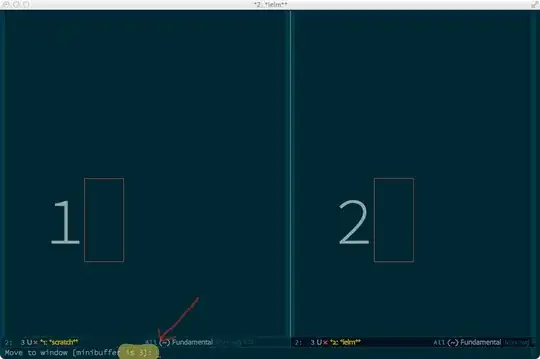
Hope it helps.

rsenna
- 336
- 3
- 14
-
1A related package is [`swap-buffers`](https://github.com/ekazakov/swap-buffers/blob/master/swap-buffers.el) which uses the same method for swapping the current buffer with that in another window. – pyrocrasty May 16 '15 at 16:57
0
;; faster switching between windows in the same frame
(windmove-default-keybindings)
Adding two above lines of code to .emacs.el will enable simple and efficient moving, not just to minibuffer, but also navigating all other windows on Emacs frame using Shift-Arrow.

Cảnh Toàn Nguyễn
- 101