Are there any tools to dump the running application from memory in Windows 7?
Asked
Active
Viewed 1.9k times


3 Answers
18
just "right click" the process in the taskmanager and select "create memory dump"
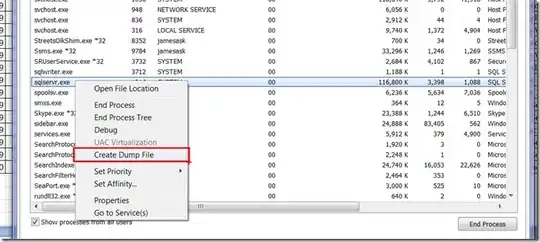

-
can i still be able to run that file? – abmv Jun 01 '10 at 10:12
-
@abmv: "run" as in .. start the dump? or do you ask if the dumping process stops the process? if it is the latter: dumping the memory does not stop the process. – akira Jun 01 '10 at 10:41
-
well i'm looking for something like PROCDUMP32 – abmv Jun 02 '10 at 16:56
-
@abmv: well, that is not what you asked for in the first place. a good tool for reverse engineering is "ida pro" (http://www.hex-rays.com/idapro). – akira Jun 02 '10 at 19:08
-
i guess the word dump was misleading thanks for you reply – abmv Jun 03 '10 at 07:02
-
Do note that you can only do this on Windows 6.x variants (Win7/Vista/2008). Win5.x cannot do this without [Process Explorer](http://technet.microsoft.com/en-us/sysinternals/bb896653) from SysInternals. – Breakthrough Jul 12 '11 at 13:46
-
yep, but thats what OP wanted :) – akira Jul 13 '11 at 11:14
2
Simplest is probably procdump from SysInternals.
The Debugging Tools for Windows gives more advanced options (e.g. automatically dump the process on certain conditions).

Richard
- 8,952
- 3
- 26
- 27
